
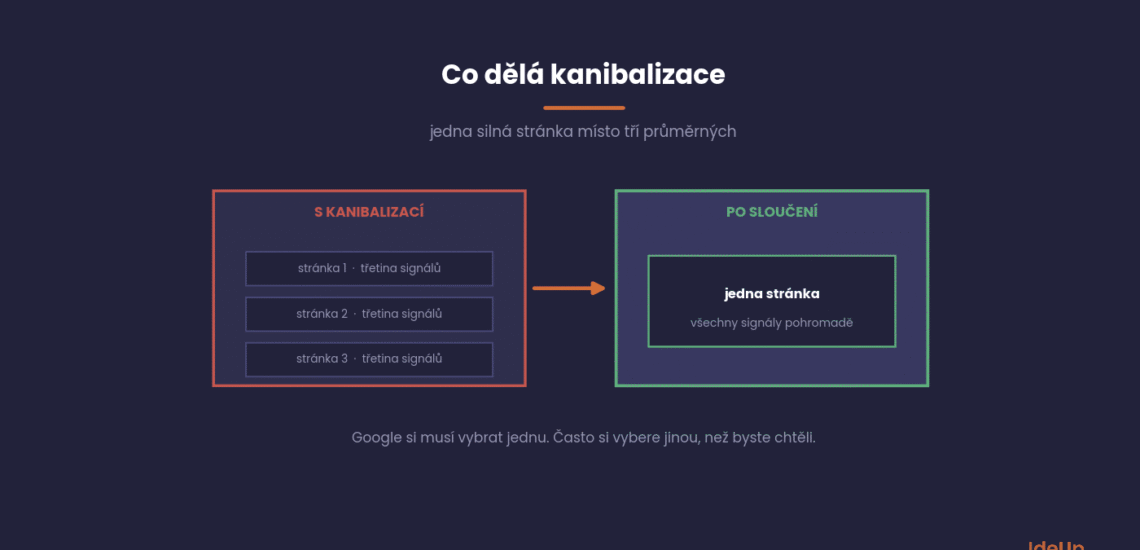
A client sent us an email: “We wrote three articles on the topic and instead of growing, our rankings dropped.” That is exactly what keyword cannibalisation looks like.
It is not an exotic problem. We see it on most websites with a few years of publishing behind them, and hardly anyone knows about it.
This article explains how to spot cannibalisation, how to tell it apart from normal fluctuation and what to do about each type.
What cannibalisation is and what it is not
Cannibalisation happens when several of your pages try to rank for the same query at once. Google has to choose one, and it often chooses a different one from the one you would want.
The consequence is not just that they take turns. The signals that would strengthen one page are split across several, so none of them is strong enough.
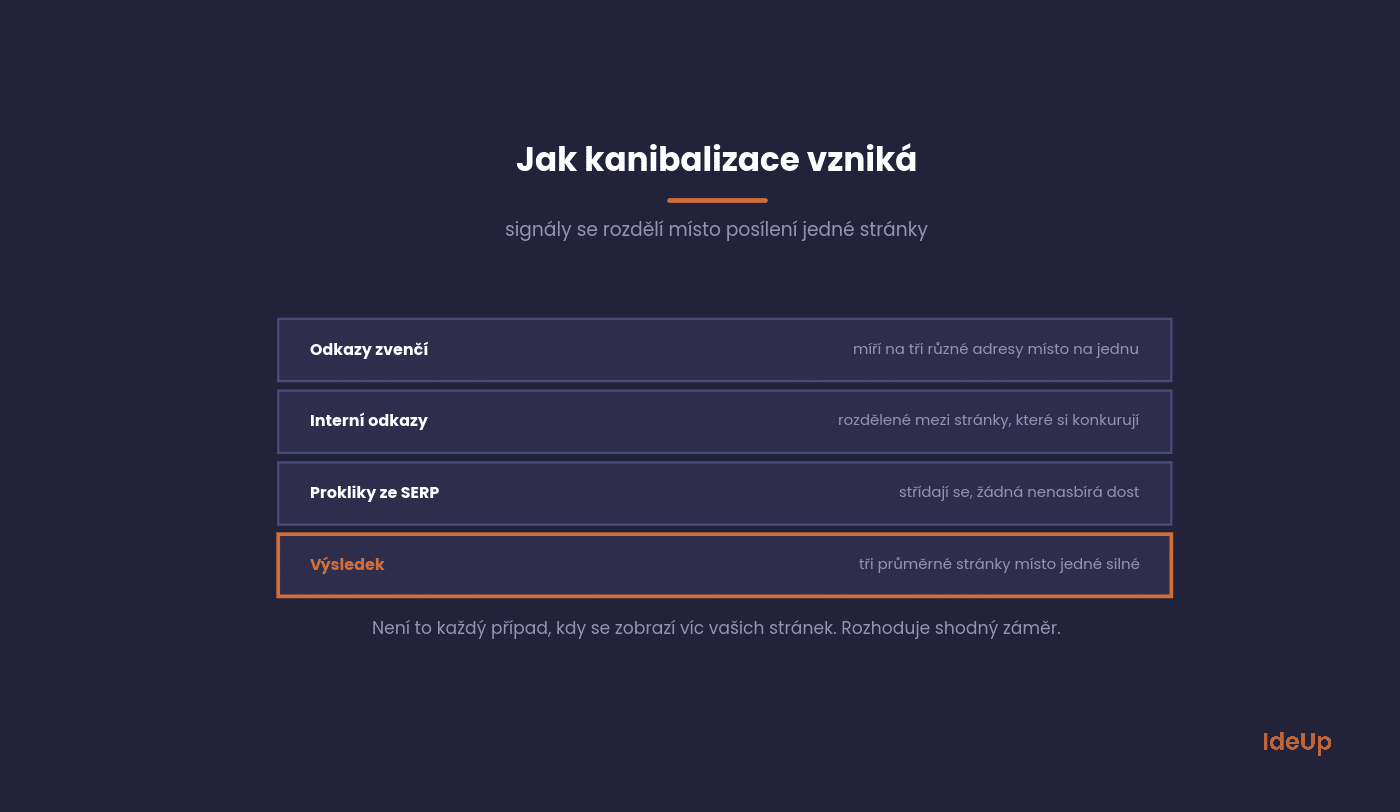
However, not every case where several of your pages appear for one query is cannibalisation. For broad queries, it is common for Google to show both a category and an article, and that is fine.
Intent is what matters. When two pages answer the same question with the same type of content, it is a problem. When one explains and the other sells, it is not.
Why keyword cannibalisation happens
Keyword cannibalisation (spelled cannibalization in American English) rarely comes from a single decision. It builds up over time, usually because nobody keeps track of which page covers which topic.
The most common causes are:
- Several people write for the same site without a shared plan, and each covers a topic they think is missing.
- Someone writes a new article to refresh an old topic instead of updating the original page.
- Titles and main headings on different pages use almost the same wording.
- Tag, archive and author pages list the same posts and compete with the posts themselves.
- Product variants such as colours or sizes each have their own URL with nearly identical text.
- Internal links use the same anchor text but point to different pages, so it is unclear which one you consider the main page.
Knowing the cause helps you choose the right fix. It also stops the problem from coming back after you have dealt with it.
How to spot it
You do not need a paid tool. Search Console and ten minutes of work are enough.
The process is the same every time, and it uncovers cases you would not have thought of.
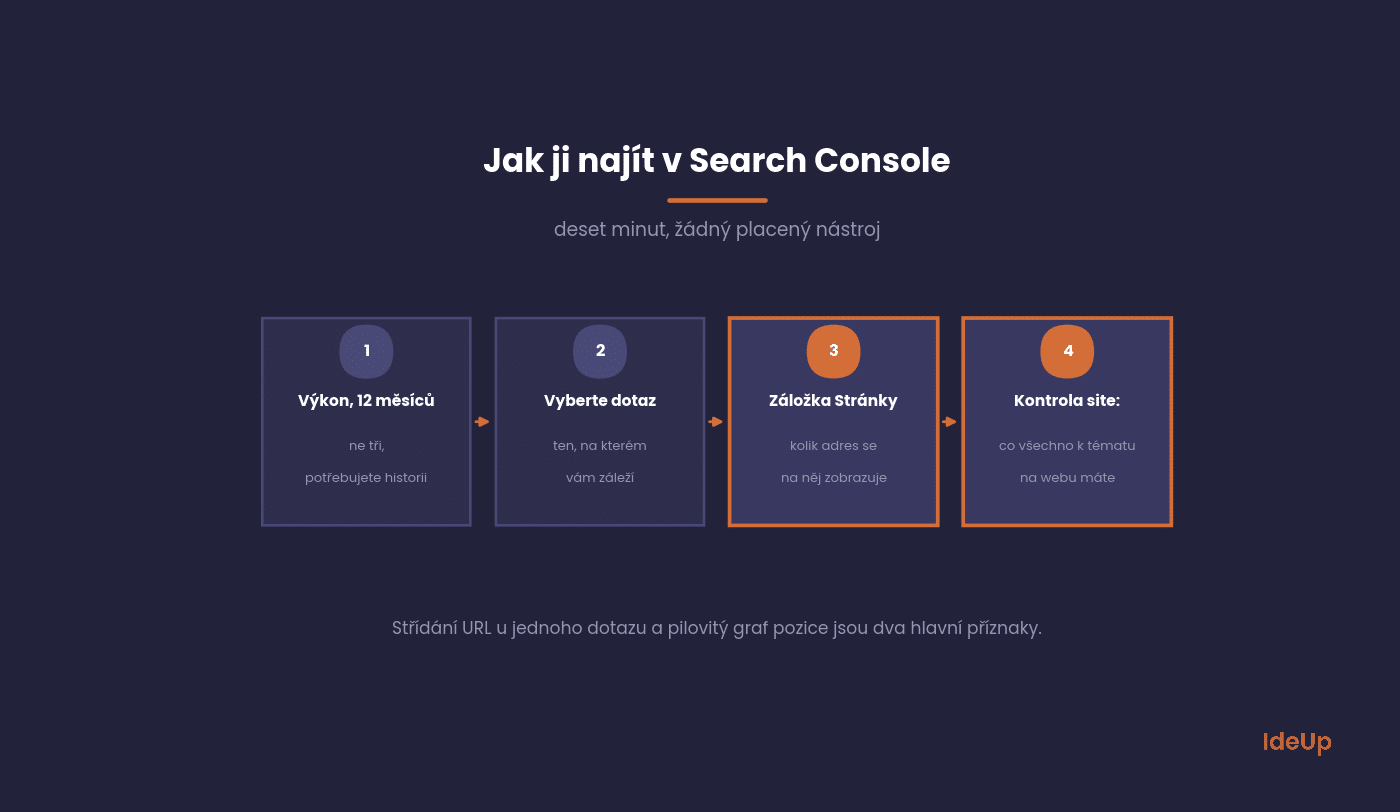
In Search Console, open Performance and switch to twelve months. Select a specific query and switch to the Pages tab.
When several URLs appear for one query and their impressions alternate over time, you have a candidate. When there is one dominant URL and the others have a fraction of the impressions, everything is fine.
The second symptom is a sawtooth position graph for one query with no obvious cause. Google keeps choosing a different page and the average jumps around.
The third check is manual: search for the query with the site: operator and your domain. You will see all your pages on that topic, including the ones you had forgotten about.
Four types and what to do with each
The solution is not always merging. The fix depends on why the cannibalisation arose.
The following four cases cover almost everything we come across.
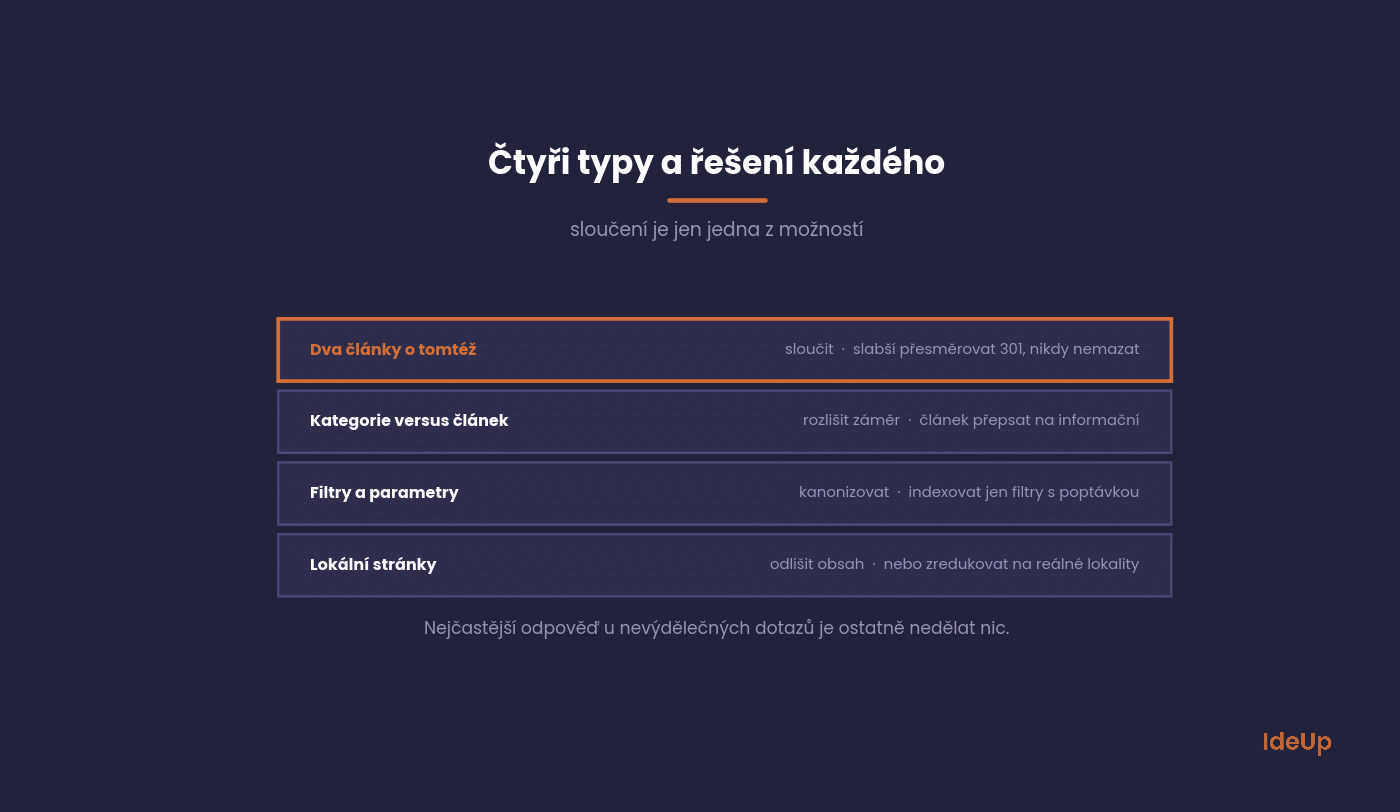
Two articles on the same topic
A classic on blogs that have been publishing for years. Two pieces on the same topic, written two years apart.
The solution is to merge. Take the stronger page, add the best of the other one to it and redirect the weaker one with a 301. Never just delete it.
Category versus article
The most common case for online shops. A blog article appears instead of the category for a query with purchase intent.
The solution is not to delete the article. Rewrite it to target an informational query and link to the category from its text. We describe splitting by intent in our article on keyword research.
Filters and parameters
Several filter URLs target practically the same thing. Typically sorting variants or combinations that produce the same result.
The solution is technical: canonicalise to the main variant and index only filters with genuine demand. This ties in with technical SEO.
Local pages
Ten pages for ten cities with practically the same text. Google picks one and ignores the rest.
The solution is either to give each page genuinely different content or to reduce them to the locations where you actually operate.
How to decide which fix fits your case
When you find two pages competing, answer these questions in order. The first question you answer with yes usually points to the right fix.
- Do both pages serve the same purpose for the reader? Merge them.
- Does one page explain and the other sell? Keep both, sharpen the focus of each and link from the explaining page to the selling one.
- Are the pages technical variants of the same content? Use a canonical tag pointing to the main version.
- Does one page have no visitors, no links and nothing worth keeping? Redirect it to the closest relevant page.
- Is the page that currently ranks doing well enough? Consider leaving things as they are.
How to merge pages without losing anything
Merging is an intervention after which rankings drop for a few weeks. If it is done badly, they will not come back.
The order of the steps matters more than speed.
First, decide which page stays. What decides it is the number of links, its history and whether it matches the intent, not the length of the text.
Move into it what the weaker page has that it lacks. Do not copy the whole text, take only the passages that add value.
Then set up a 301 redirect from the weaker page to the stronger one and go through your internal links. Point all those that led to the old URL directly to the new one.
Finally, submit the new version for indexing and change nothing for four to six weeks. There is no point evaluating it sooner.
Ahrefs has a detailed analysis of cannibalisation, including cases where it is better to do nothing. Incidentally, that is a more common answer than you might think.
Common mistakes when you fix keyword cannibalisation
Most failed fixes come from a handful of repeated errors. Check your plan against this list before you change anything.
- Redirecting to an unrelated page. A redirect only carries value when the target covers the same topic. If you send a page to your homepage, you usually waste it.
- Using noindex instead of merging. The page disappears from the results, but its links and content no longer help any other page.
- Merging pages with different intent. A guide and a product page serve different needs. If you force them into one page, you weaken both.
- Creating redirect chains. If an old URL already redirects elsewhere, point it straight at the final page.
- Forgetting the sitemap. Remove redirected URLs from it so you are not listing pages that no longer exist.
- Fixing everything at once. If you change dozens of pages in one week, you cannot tell which change helped and which one hurt.
How to prevent it
The cheapest fix for cannibalisation is not to create it. One rule and one document are enough.
The rule is: one page, one cluster of queries. The document is a map of keywords to specific URLs.
Before you write a new piece, check the map to see whether a page on that topic already exists. In half of cases, you will find that updating is enough instead of writing.
For online shops, add a second rule: no new category is created until it is clear how it differs from the existing one. Not only in its product range, but also in the query it targets.
Questions that come up
Five questions we get when someone’s rankings fluctuate for no apparent reason.
The answers apply in general, the details differ for each specific website.
Does cannibalisation harm the whole website?
Not directly, the impact is at the level of specific queries. Indirectly, yes, because you dilute both capacity and links.
On websites with thousands of pages, you also waste the time the crawler has for your site.
Should I delete old articles?
Almost never delete. Merge and redirect, yes.
A deleted page with links means you have thrown those links away. A redirect keeps them.
How long does it take to show results?
Four to eight weeks after merging. The first ten days are usually worse than before the change, which is normal.
If nothing has improved after two months, the problem lay somewhere other than cannibalisation.
Can a domain cannibalise a subdomain?
It can, and it is a worse case because it is harder to fix. A blog on a subdomain competing with the main website is a classic.
The solution is usually to move the content into a subfolder of the main domain, but that is a project, not a tweak.
Does canonical help?
For technical duplicates, yes, for two different articles, no. A canonical says which version is the main one, it does not solve the fact that you have two different texts about the same thing.
For content cannibalisation, the right tool is merging and redirecting.
Where to start on your site
Take the three queries that matter most to you and check the Pages tab for each one in Search Console. Within ten minutes, you will know whether you have a problem.
If you do, start with the most profitable one. There is no point fixing cannibalisation for queries that lead nowhere.
Want to review your whole website at once? Cannibalisation is a standard part of our SEO audit, and we also handle it as part of search engine optimisation.
Frequently asked questions about keyword cannibalisation
What is keyword cannibalisation?
Keyword cannibalisation is a situation where two or more pages on your own website compete for the same topic and the same reader need. You end up with several weaker pages that take turns ranking instead of one strong page.
How do you fix keyword cannibalisation?
First identify which pages compete and why. Merge pages with the same purpose, separate pages with different purposes and use canonical tags for technical duplicates. Then update your internal links and wait several weeks before you judge the result.
Is keyword cannibalisation always a problem?
No. If two of your pages answer different needs, such as a guide and a product page, it is normal for both to appear. It becomes a problem when pages with the same purpose split attention and neither of them performs well.
Can internal links cause keyword cannibalisation?
They can make it worse. If you link to different pages with the same anchor text, you send mixed signals about which page is the main one. Pick one page per topic and point all your internal links on that topic to it.