
When you see star ratings and a price for a product, a preparation time for a recipe or opening hours for a business in search results, it is neither chance nor a guess by Google.
It is structured data: code through which a page tells Google what it contains. Without it, the crawler has to guess from the text.
This article explains how it works, which types bring real benefits to Czech websites and how to check whether you have any at all.
What structured data does
A search engine can read the text of a page, but it does not understand it the way a person does. It cannot reliably tell that “1,290 CZK (about 59 USD)” is the product price and not the shipping cost.
Structured data is a way of telling it directly. A small piece of code in JSON-LD format is added to the page, describing the content in machine-readable form.
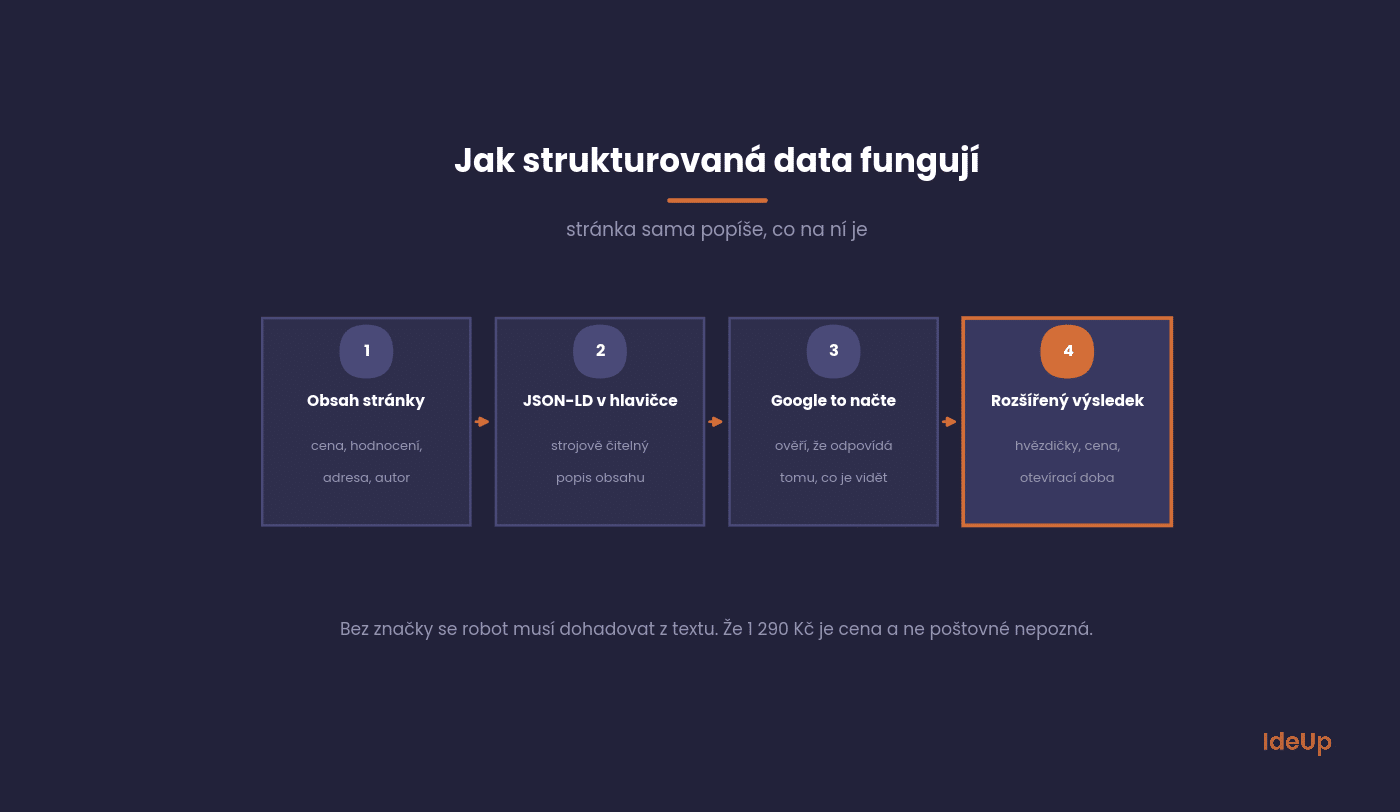
The reward is rich results. The page takes up more space in the results and carries information that helps people decide to click.
The effect shows not in your position but in your click-through rate. If your result has star ratings and a competitor’s does not, you can win some of the clicks even from a lower position.
What is schema markup
Schema markup is the shared vocabulary you use to write structured data. It comes from schema.org, a project launched in 2011 by Google, Microsoft, Yahoo and Yandex. It defines types such as Product, Event or Person, and the properties each type can have, such as name, price or address.
Structured data is the general idea of describing content in a machine-readable way. Schema markup is the specific set of names you use to do it. In everyday use, the two terms mean almost the same thing.
Three formats, one vocabulary
The same schema.org vocabulary can be written in three formats.
- JSON-LD is a separate block of code that sits apart from the visible content.
- Microdata adds attributes directly to the HTML elements that show the content.
- RDFa works in a similar way to Microdata, with a different set of attributes.
Microdata and RDFa still work, so you may find them in older themes and templates. For new work, there is little reason to choose them.
Which types make sense for Czech websites
Schema.org defines hundreds of types. Around thirty of them produce a rich result in Google, and only a handful of those are relevant to Czech websites.
You can implement the others, but they will bring nothing visible.
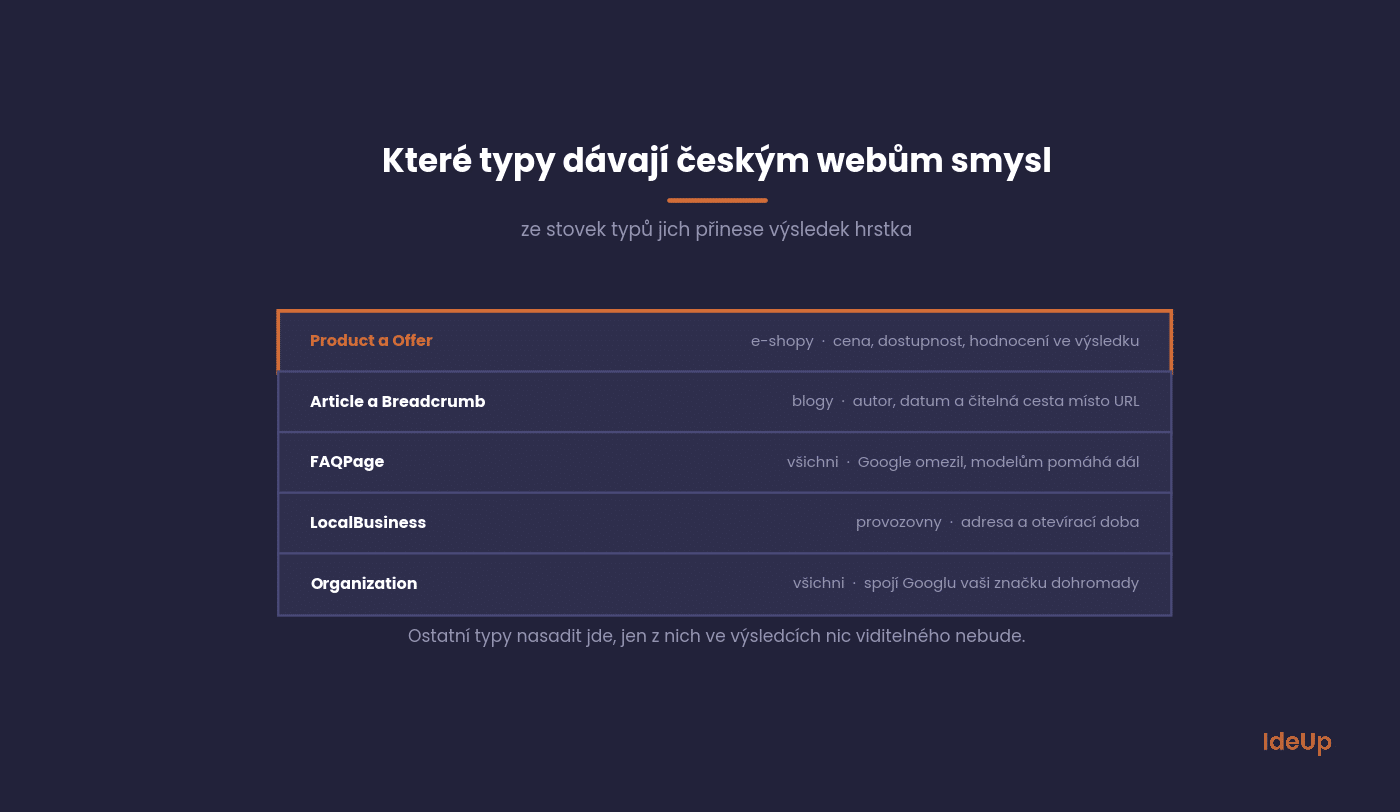
Product and Offer
The most important type of all for online shops. It brings price, availability and ratings into the results.
Watch out for one thing: ratings must be genuine and visible on the page. Made-up star ratings break the rules, and Google can detect them.
Article and BreadcrumbList
For blogs and content websites. Article describes the author and date, and breadcrumb navigation replaces the raw URL in the result with a readable path.
Breadcrumb navigation is the easiest type on the whole list to implement, yet it is often forgotten. For websites with a deeper structure, it is worth starting right here.
FAQPage
Expandable questions directly in the result. Google has gradually restricted their display, so today they appear mainly for authoritative websites.
It is still worth implementing, because a structured question-and-answer format also helps language models when they put together an answer. We cover this topic under GEO.
LocalBusiness
For businesses with physical premises. It describes the address, opening hours, phone number and line of business.
It works together with your Google Business Profile and is one of the foundations of local SEO.
Organization
A description of your company as an entity: name, logo, social networks, contact details. It does not produce a rich result, but it helps Google piece your brand together.
That is exactly why it is gaining value. In a world where a model puts the answer together, it helps if it knows clearly who you are.
Other types of schema markup you may need
The five types above cover most websites. Some businesses need one of the more specialised types as well.
- Recipe for food websites. It describes ingredients, cooking time and nutrition.
- Event for concerts, conferences and courses. It describes the date, venue and tickets.
- VideoObject for pages built around a video. It describes the title, length and thumbnail.
- JobPosting for career pages. It describes the position, location and type of contract.
- Person for author pages. It connects articles to a real person with a name and role.
Add a type only when the page really contains that kind of content. Marking up a blog post as an event will not make it one.
How to check what your website has
Before you implement anything, find out where you stand. Most modern themes and e-commerce platforms already generate some structured data on their own.
The check takes a few minutes and saves you from duplicate implementation, which does more harm than good.
The quickest option is Google’s Rich Results Test, which shows what Google sees at a specific URL and what it can display from it. The schema.org validator, which checks syntax, is a useful addition.
After that, keep an eye on the Enhancements section in Search Console. It reports errors across the whole website, not just on one page, and it is the only place where you can see what Google actually uses.
How to implement it
The format Google recommends is JSON-LD placed in the page head. It does not need to be mixed into the HTML content, which makes it much easier to maintain.
The route to implementation depends on what your website runs on.
WordPress: an SEO plugin handles most of it. Both Yoast and Rank Math generate Article, Organization and breadcrumb navigation automatically. Extras can be added with custom code.
Shoptet and similar platforms: the system generates Product and Offer itself. Check that the price and availability match what is on the page.
Custom-built website: it is generated in the template from data already on the page. Never write values by hand, as they will drift away from the content within a month.
Google provides a complete overview of supported types and required fields in its structured data documentation. It is the only source that is always up to date.
A JSON-LD schema markup example
Take a product page for a backpack that costs 59 USD. Its JSON-LD sits in a script element of the type application/ld+json and contains these lines.
- @context with the value schema.org, which says which vocabulary is used.
- @type with the value Product.
- name and image with the product name and photo address.
- offers with a nested Offer that holds price 59, priceCurrency USD and availability InStock.
- aggregateRating with the average rating and number of reviews, only if those reviews are shown on the page.
The nesting matters. The offer belongs to the product, so it sits inside it rather than next to it. The same logic applies to an article and its author, or a business and its address.
How to write your own in four steps
- Choose the type that matches the main content of the page.
- Look up its required and recommended fields in Google’s documentation.
- Fill each field from data the template already shows on the page.
- Run the page through the Rich Results Test before and after publishing.
The most common mistakes
Structured data errors have one unpleasant feature: the website keeps working and nothing looks wrong. The rich result simply does not appear.
These are the four we come across most often.
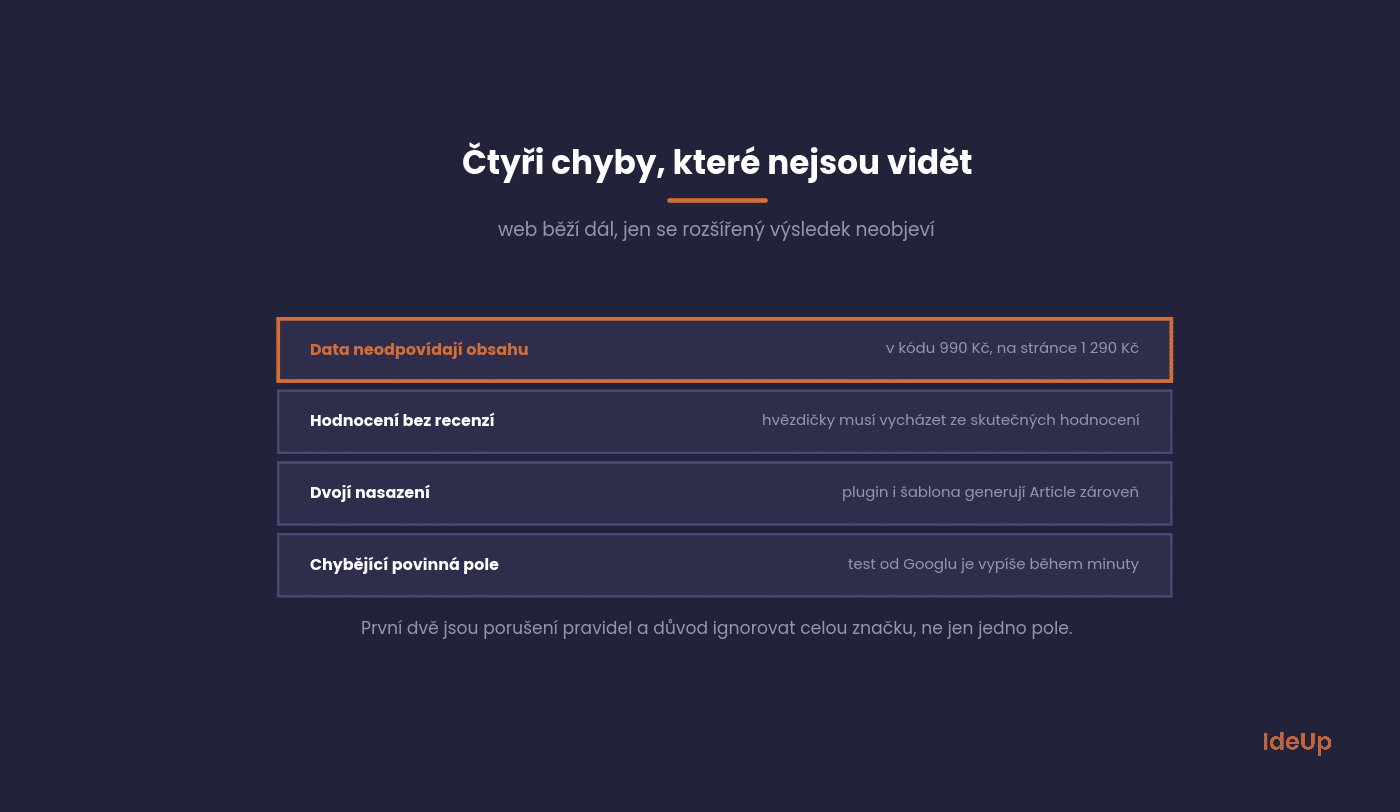
Data does not match the page content. The code says 990 CZK (about 46 USD), the page says 1,290 CZK (about 59 USD). This breaks the rules and is a reason for the entire markup to be ignored.
Ratings without reviews. Star ratings must be based on genuine reviews that are visible on the page.
Duplicate implementation. The plugin generates Article and so does the theme. Google then sees two conflicting definitions.
Missing required fields. Each type has fields without which the rich result will not appear. Google’s test lists them.
Questions about structured data
The five questions we hear most often on this topic.
For most of them, the answer is shorter than people expect.
Will structured data improve my rankings?
Not directly, as it is not a ranking factor. It does improve click-through rate, though, and that shows in the results.
A higher click-through rate means more visits from the same position. That is a measurable effect, just a different one from what companies expect.
How long does it take for a rich result to appear?
Anywhere from a few days to several weeks. Google has to crawl the page again and decide whether to show a rich result. You are not entitled to one.
You can speed it up by requesting reindexing in Search Console. That still does not guarantee it will be displayed.
Do I have to write it by hand?
Not on common platforms. Manual work makes sense for types the system does not support, or for a custom-built website.
For manual work, one rule applies: always generate values from the data on the page, never hard-code them.
What if I have an error in Search Console?
Check whether it affects a type that actually brings you something. An error in a type that has no rich result anyway is not a priority.
Errors also often come from the template rather than a single page. A fix in the template clears hundreds of issues at once.
Does structured data help with AI answers?
Nobody has proven a direct effect, but a structured and consistent description of content makes the model’s job easier. It certainly will not do any harm.
The Organization type is the most useful here, because it tells the model clearly who is behind the content.
Where to start
Run your website’s most important page through Google’s Rich Results Test. Within a minute, you will know what it has and what is missing.
Then check the Enhancements section in Search Console for any errors you did not know about.
If it turns out something needs adding, we handle structured data both when building websites and as part of search engine optimisation.
Frequently asked questions about schema markup
What is the difference between schema markup and structured data?
Structured data is the general practice of describing page content in a machine-readable form. Schema markup is the schema.org vocabulary you use to write it. In practice, people use the two terms almost interchangeably.
What are the main types of schema markup?
For most websites, the useful ones are Product, Article, BreadcrumbList, FAQPage, LocalBusiness and Organization. Specialised websites may also need Recipe, Event, VideoObject or JobPosting. Choose the type based on what the page actually contains.
Is FAQ schema markup still worth adding?
Google now shows expandable questions mainly for authoritative websites, so you should not count on a visible rich result. The markup still gives your questions and answers a clear structure that machines can read. Use it only for questions that are visible on the page.
Can I use more than one type of schema markup on one page?
Yes. A product page can carry Product, BreadcrumbList and Organization at the same time. Each type should describe something real on the page, and each should appear only once, so check that your plugin and theme do not both generate it.
USD amounts are approximate, converted at the Czech National Bank rate of 21.75 CZK per USD on 9 October 2026.