The question “which SEO tools do you use?” comes up at almost every first meeting. Clients expect a list. The answer they get is less comfortable: no tool will do SEO for you. A tool supplies data. Deciding what that data means and what you do about it is still up to a person.
That is why paying for five subscriptions at once makes no sense. What makes sense is having two or three tools you really know how to use. This overview covers which ones they are, what you can get for free and where you pay for data you will not get anywhere else.
Four tasks, four types of tools
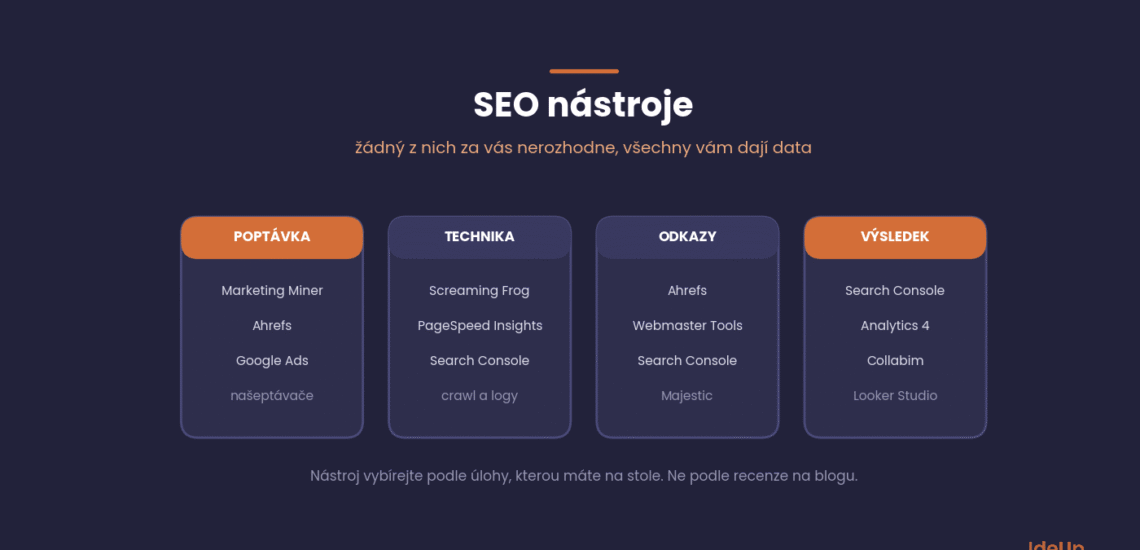
All of SEO can be broken down into four questions, and these also guide your choice of software:
- Demand. What people search for, how often and with what intent. This is where keyword research belongs.
- Technical. Whether the crawler can reach your website and what it finds there.
- Links. Who links to you and who links to your competitors.
- Results. What actually happened: rankings, clicks, revenue.
Most companies start with the third and fourth, because they are the most visible in a report. It is more effective to start with the first, because that is where you decide what to target in the first place.
What SEO tools are and where their data comes from
SEO tools are software that collect, process and display data about how a website is discovered, crawled, linked and visited. Before you trust any number in them, it helps to know where the number comes from. By data source, the tools fall into three groups.
- First-party data. Information about your own website, collected directly by the platform or your tracking code. It is the most accurate, but it only describes you.
- Third-party estimates. Tools that run their own crawlers across the web and model traffic and demand from various data sources. They can show you any domain, but their figures are approximations.
- Crawlers you run yourself. Software that walks through your website the way a bot would and reports what it finds. The data is exact, but it is a snapshot of one moment.
The practical rule follows from this. Base decisions about your own website on first-party data, and use third-party estimates for direction and for comparing yourself with others.
What you get for free
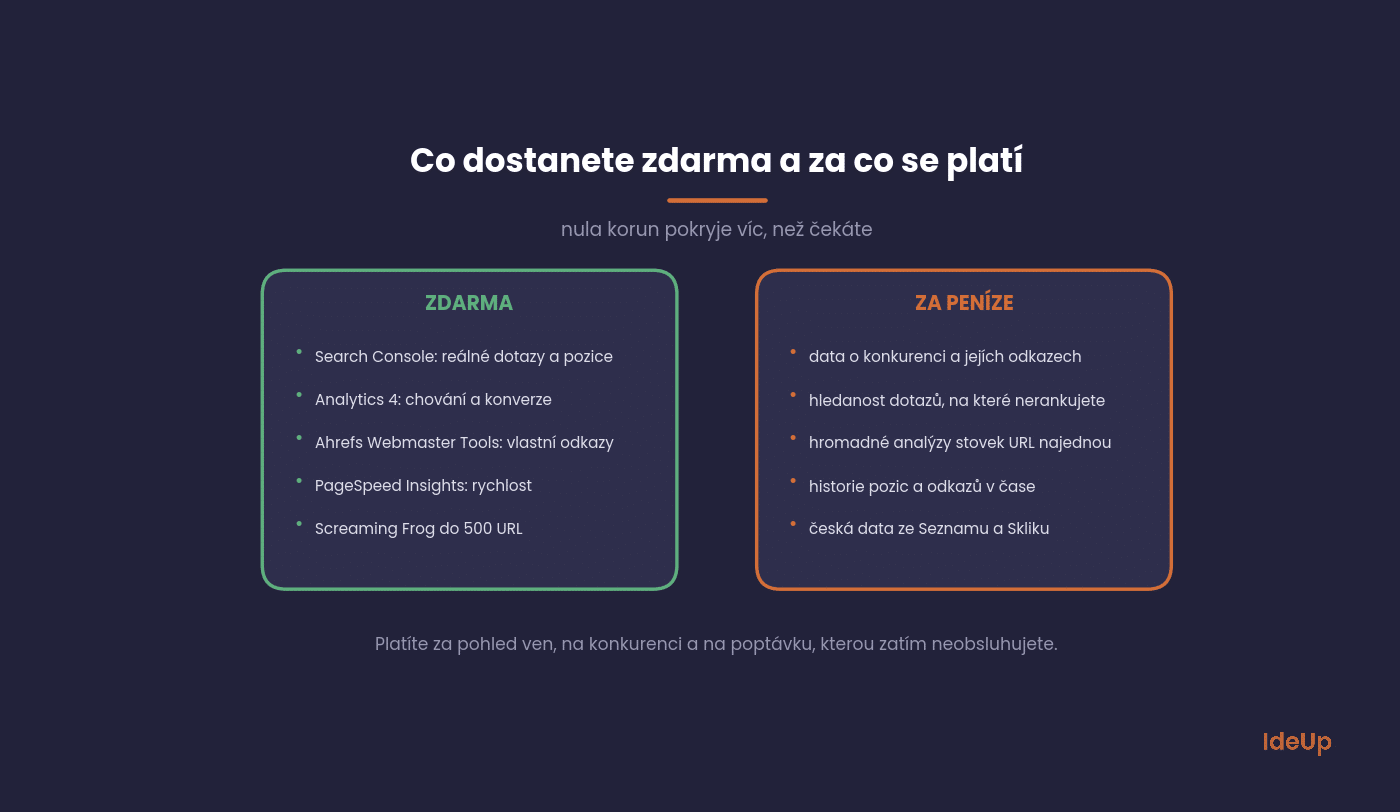
Google Search Console
The only source of truth about how your website performs in search. Other tools estimate rankings and search volume, while Search Console shows what actually happened: which queries you appeared for, how many people clicked, what your click-through rate was and how many impressions you collected. It is free and every single website should have it set up.
The Performance section is the most valuable. Queries where you rank in positions 5 to 15 with high impressions are the cheapest opportunity your website has: a small change to the title or some added content will bring more there than a new article.
Google Analytics 4
Search Console stops at the click, Analytics carries on. It shows what visitors did on the website, where they left and whether they bought anything. Without connecting the two, it is hard to talk about SEO in terms of revenue, and that is how it should be talked about.
Ahrefs Webmaster Tools
The free version of Ahrefs for owners of a verified website. You get the link profile of your own domain and a basic technical audit. For a smaller company it is quite sufficient, because you will learn almost everything about your own website.
PageSpeed Insights
Speed and Core Web Vitals. Do not expect speed alone to shoot you up the rankings, but a slow website costs conversions even among people who do reach it. Data from real visits (CrUX) matters more here than the lab score.
Screaming Frog up to 500 URLs
A classic crawler. The free version crawls 500 URLs, which is plenty for a small website or one section of an online shop. It uncovers duplicate titles, missing descriptions, redirect chains and pages that return errors.
What you pay for
For free, you learn a lot about yourself. Paid tools open up the outside view: competitors, demand you are not yet serving, and history.
Ahrefs
If we could keep only one paid tool, it would be Ahrefs. Keywords, links, competitors, technical audit, all in one. Its greatest strength is competitor analysis: within moments you can see what your competitors live on, which pages bring them traffic and where their links come from. It is the fastest way to find out what works in the market without having to test it yourself.
Its weakness is Czech data. Ahrefs often underestimates search volume for smaller Czech queries or does not know them at all, which is why we combine it with Marketing Miner. The second weakness is price: for a small website just starting out, it is overkill.
Marketing Miner
A Czech tool with one key advantage: data from Seznam (the Czech search engine) and Sklik, which foreign tools do not have. For a Czech website, its search volumes are more accurate. It also handles bulk analyses: you upload hundreds of URLs or keywords and the tool pulls in data for all of them at once. This saves hours of manual work, especially when planning content and designing filter pages for an online shop, where you collect the long tail.
It is considerably more affordable than its foreign competitors. For a sole trader or a smaller company, it is the most sensible first paid tool of all.
Collabim
A Czech classic for rank tracking. It tracks both Google and Seznam, which is still relevant on the Czech market. It is useful when you need a regular overview of how rankings develop for a defined list of queries, typically for reporting to a client or management.
Semrush
An Ahrefs competitor with broader coverage of PPC and content. If you do SEO and paid search under one roof, you will appreciate seeing both in one interface. For pure link data, Ahrefs tends to be stronger.
Screaming Frog with a licence
Once your website has more than 500 URLs, the licence pays for itself almost immediately. A crawl of an online shop with ten thousand URLs reveals problems you would only see in Search Console months later.
Looker Studio
It is not an SEO tool, but the place where you bring the other data together into one report. Free, with connections to both Search Console and Analytics. As soon as you report to more than one person, it saves you hours every month.
How to analyse competitors with SEO tools
Competitor analysis is the main reason to pay for a tool, so it is worth doing it in a fixed order rather than clicking through reports at random.
- Pick the right competitors. Your online rivals are the websites that appear for the topics you want, which are not always your business rivals. A publisher or a comparison site can take more of your audience than another shop.
- Look at their top pages. Find out which of their pages bring the most estimated traffic. This tells you which formats and topics work in your market.
- Find the gaps. Compare the topics where they are visible and you are not. These are candidates for new or expanded pages.
- Check their links. Websites that link to several competitors but not to you are the most realistic link opportunities.
- Open the pages yourself. A tool shows numbers. Only reading the page shows you its depth, structure and how current it is.
- Turn it into a short plan. End with a handful of actions ranked by their likely value, not a spreadsheet of hundreds of rows.
Quick comparison
| Tool | What it is for | Price |
|---|---|---|
| Google Search Console | real queries, rankings, indexing | free |
| Google Analytics 4 | on-site behaviour, conversions | free |
| Ahrefs Webmaster Tools | links and audit of your own website | free |
| PageSpeed Insights | speed, Core Web Vitals | free |
| Screaming Frog | technical website crawl | free up to 500 URLs, then a licence |
| Marketing Miner | Czech data, bulk analyses | from a few hundred CZK a month |
| Collabim | rank tracking, Google and Seznam | from hundreds of CZK a month |
| Ahrefs | competitors, links, keywords | high hundreds to thousands of CZK a month |
| Semrush | SEO and PPC in one | comparable to Ahrefs |
A minimal stack that makes sense
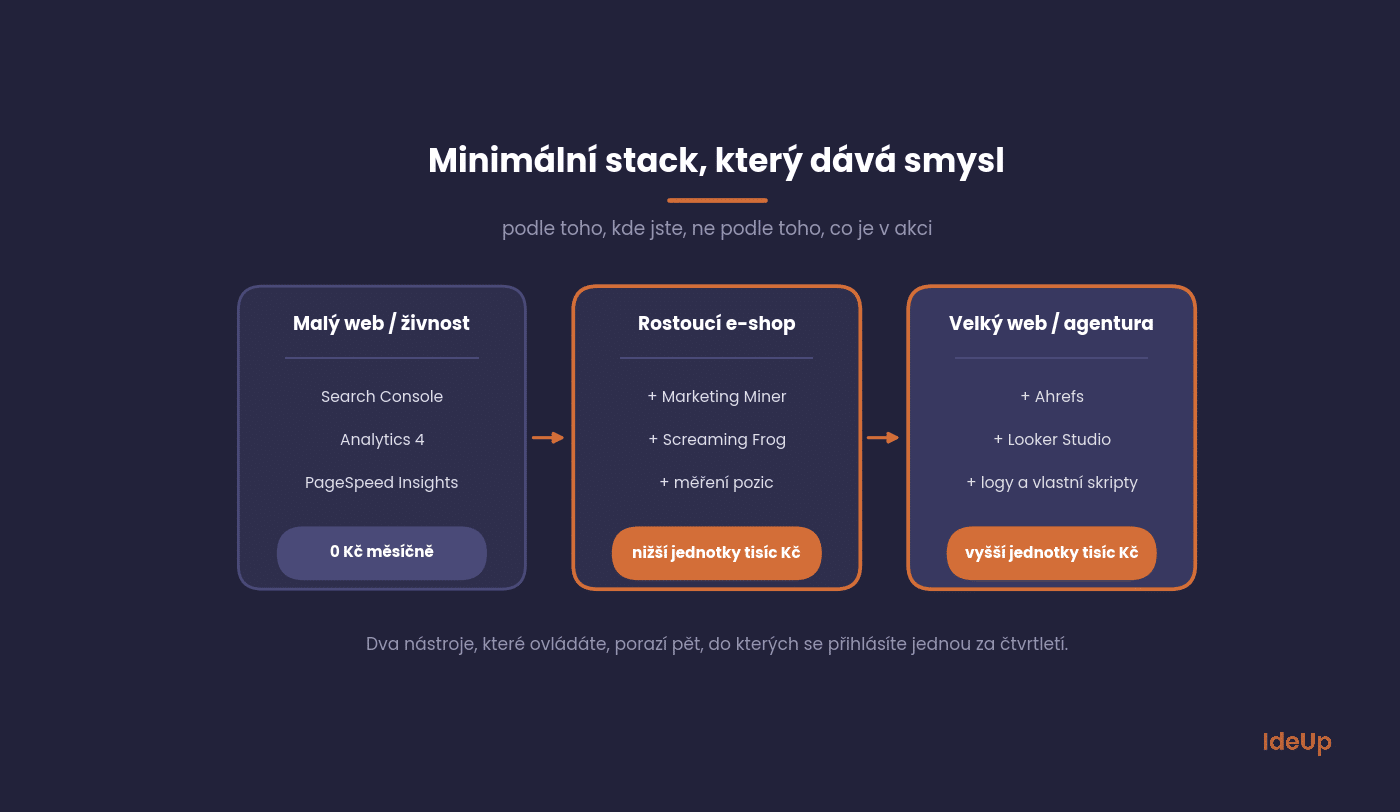
Small website or sole trader. Search Console, Analytics 4, PageSpeed Insights. 0 CZK (about 0 USD) a month, and you cover ninety per cent of what you need to know at this stage.
Growing online shop. Add Marketing Miner for Czech data, a Screaming Frog licence for regular crawls and some form of rank tracking. We are still talking about a few thousand CZK a month.
Large website or agency. Ahrefs as the main analytics tool, Looker Studio for reporting, plus log analysis and custom scripts. At this level, even what looks like a luxury elsewhere pays off.
Choosing SEO tools for a small business
For a small business, the best tool is rarely the one with the most features. Before you pay for anything, answer a few questions honestly.
- Do you have time to act on the data? If nobody will work with the reports every week, a subscription only produces unread exports.
- Does the tool cover your market? Check its data for your country and language on a few topics you know well before you rely on it.
- Do you need the outside view now? If you have not yet fixed what your free tools show, competitor data can wait.
- Can you pay for it only when you need it? Many businesses subscribe for a single month to plan a project, then cancel and come back later.
Free tools give you accurate data about yourself at no cost, but no view of the market. Paid tools give you that view, but they cost money every month and take time to learn. Most small businesses do well starting free and adding one paid tool when a specific question cannot be answered without it.
AI tools and visibility in answers
Language models now belong in the stack too, but not as a generator of blog posts. They are useful for other things: clustering keywords into topics, quick breakdowns of competitor content, drafting article structures, reading large exports.
The second, more important point is that search is changing. Answers are increasingly put together by AI, which decides whom to cite. This is the focus of GEO, or generative engine optimisation. In practice, it means tracking whether the models mention you, not just whether you are in third position on Google.
How not to use tools
- Do not chase scores. The health score in an audit, the content score in an optimisation tool, domain authority. These are simplifications, not goals. This applies doubly to domain authority: it is an estimate by an SEO tool, not a Google metric, and it is easier to inflate than traffic.
- Do not treat search volume as fact. It is an estimate. Two tools will give you two different numbers for the same query, and both will be off.
- Do not fix issues in the order they are listed. A tool lists two thousand findings sorted by type, not by impact on revenue. Prioritisation is a job for a person, and it is the core of a proper SEO audit.
- Do not ignore search intent. High search volume for a query where Google only shows how-to guides will not push your online shop category up.
Questions about tools
What you ask us most often about tools.
Which SEO tool is the best?
The one you know how to use. If you are choosing a single paid tool for a Czech website, go for Marketing Miner. If you mainly need competitors and links, Ahrefs.
Can you do SEO for free?
You can manage your own website with Search Console, Analytics and PageSpeed Insights. What you will not see for free is your competitors and the demand you are not yet targeting.
Ahrefs or Semrush?
For links and competitor analysis, Ahrefs. When one team does both SEO and PPC and wants everything in one place, Semrush.
Do I need rank tracking if I have Search Console?
Search Console shows the average position across devices and locations, which is of limited use for detailed tracking. If you report on a specific set of queries, separate rank tracking makes sense. Otherwise, it does not.
Will AI replace SEO tools?
It will not replace the data, but it will replace much of the manual work with it. Analysis and decisions are still made by people.
How to choose
The best SEO tool is the one you use regularly and whose output you understand. Three free tools you come back to every week will bring more than five paid ones you log into when a report is due.
At IdeUp, we work with exactly this stack, whether for search engine optimisation, link building or keyword research. If you are not sure which of these you need, get in touch for SEO consulting. We will go through your website and tell you straight when free tools are enough.
Frequently asked questions about SEO tools
What are SEO analysis tools?
They are tools that examine a website and report on its technical state, content, links and performance. Some analyse your own website directly, others estimate data about any domain. Together they show you what to fix and where your opportunities lie.
Which SEO competitor analysis tools are worth paying for?
Look for a tool with a large link index, reliable data for your market and reports that show competitors’ top pages and content gaps. Ahrefs and Semrush are the usual choices for this work. Test the data on competitors you already know well before you commit.
Are free SEO tools enough for a small business?
For looking after your own website, often yes. Free tools show you how your pages perform, what visitors do and what is technically broken. They become limiting when you need to study competitors or find demand you are not yet serving.
How many SEO tools do I need?
Usually two or three that you use regularly. One source of first-party data, one crawler and, when needed, one tool for the market view cover most work. Adding more tools tends to add overlap rather than insight.
USD amounts are approximate, converted at the Czech National Bank rate of 21.75 CZK per USD on 9 October 2026.