
“Could you have a look at our website and tell us if the SEO is OK?” We hear this almost every week. The answer is always the same: we can have a look, but it depends on what you expect from it. The difference between a free online scan and a proper SEO audit is the same as the difference between taking your temperature and seeing a doctor. Both are useful, but only one tells you what to do about it.
This article walks you through what an SEO audit includes, what you can do yourself for free and when it makes sense to bring in someone from outside. The goal is not to get you to hire us. The goal is for you to know what you are paying for if you do hire someone.
What an SEO audit actually is
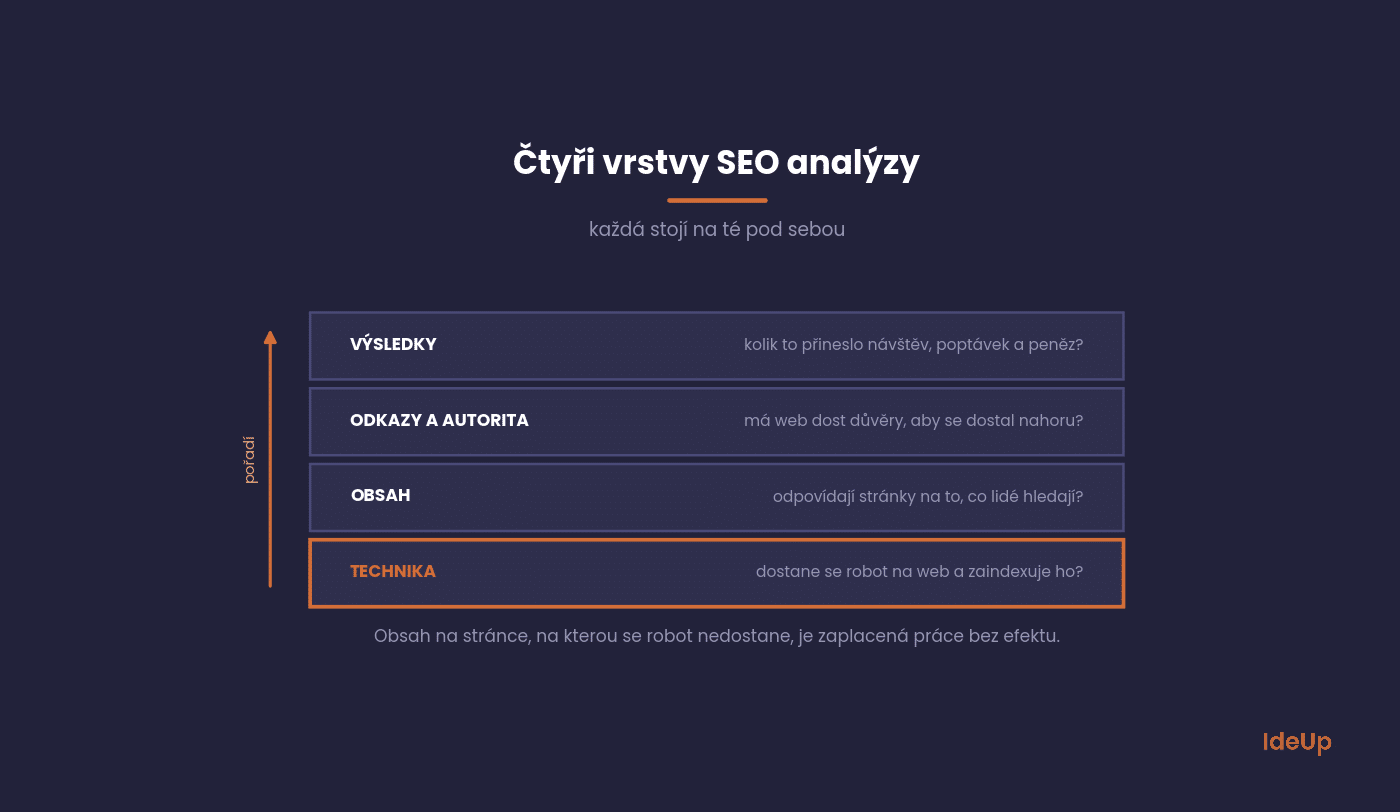
An SEO audit is a stocktake of why your website gets (or does not get) traffic from search. It is not a list of errors. It is about understanding where opportunities are being lost. It covers four layers, in this order, because each one builds on the one before it.
Technical
Can the search engine reach your website, crawl it and index it? This covers status codes, redirects, canonicalisation, the sitemap, robots.txt and speed. If this layer is not right, everything else is an academic debate.
Content
Do your pages answer what people are actually searching for? This is where you look at site structure, topic coverage, duplicates and whether every important page has its own keyword and a clear role.
Does the website have enough trust to get its content to the top at all? We cover this topic in our article on what the number of backlinks and domain authority mean.
Results
What is really happening: how many people came, from which queries, what they did and how much of it turned into money. Without this layer, an audit is just a collection of opinions.
What you can do yourself for free
You can handle most of the first level without a paid tool. The following five steps take an afternoon and will uncover most of what tends to be seriously wrong.
1. Find out what your website really lives on
In Google Search Console, open Performance and switch to the last 12 months. You are interested in two things: which pages bring the most clicks, and for which queries. It is almost always different from what management expects.
2. Find opportunities within reach
In the same report, filter for queries where the average position is between 5 and 15 and you also have a lot of impressions. These are pages where a tweak to the title or an extra paragraph, not a new article, stands between you and significantly higher traffic.
3. Check what is in the index
The Page indexing section in Search Console shows how many URLs Google knows about and how many it has excluded. This is where online shops get the most surprises: filters and product variants are either missing entirely or there are ten times as many of them in the index as there are products.
4. Run your website through a crawler
The free version of Screaming Frog crawls 500 URLs. That is enough for a smaller website and will reveal duplicate titles, missing descriptions, redirect chains and pages that return an error. We have written up which tool to use for what in our overview of SEO tools.
5. Measure speed
PageSpeed Insights shows you Core Web Vitals. Look at the data from real visits, not the lab score. A slow website is not necessarily the reason for a drop in rankings on its own, but it kills conversions among people who have already reached the site.
An SEO audit checklist for the rest of the website
The five steps above give you the big picture. Once you have it, go through the points below. Each one is a yes or no question, so you can tick them off in a simple spreadsheet.
- One version of the site. The http, https, www and non-www addresses all redirect to a single preferred version.
- Mobile view. Every important template, such as the homepage, a category, a product and an article, works on a phone without zooming or horizontal scrolling.
- One H1 per page. Each page has a single main heading that says clearly what the page is about.
- Click depth. You can reach important pages within three or four clicks from the homepage.
- Orphan pages. No page you care about is left without internal links pointing to it. Compare the crawl with your sitemap to find the gaps.
- Images. Files are compressed and have descriptive alt text.
- Structured data. If you use it, Google’s Rich Results Test reports no errors on your main templates.
- Language versions. If your site runs in several languages, each version has hreflang tags pointing to the others, and visitors are not redirected automatically based on their location.
- Pages that should stay hidden. Results of the site’s own search box, test pages and staging copies are kept out of the index.
Write down every “no” together with the URL where you found it. That list is the raw material for the priority matrix further down.
Where a free scan ends
Online tools along the lines of “enter a URL and get an SEO score” are a good alarm clock, not a diagnosis. They can only do what can be measured on a single page without context. They cannot do what matters.
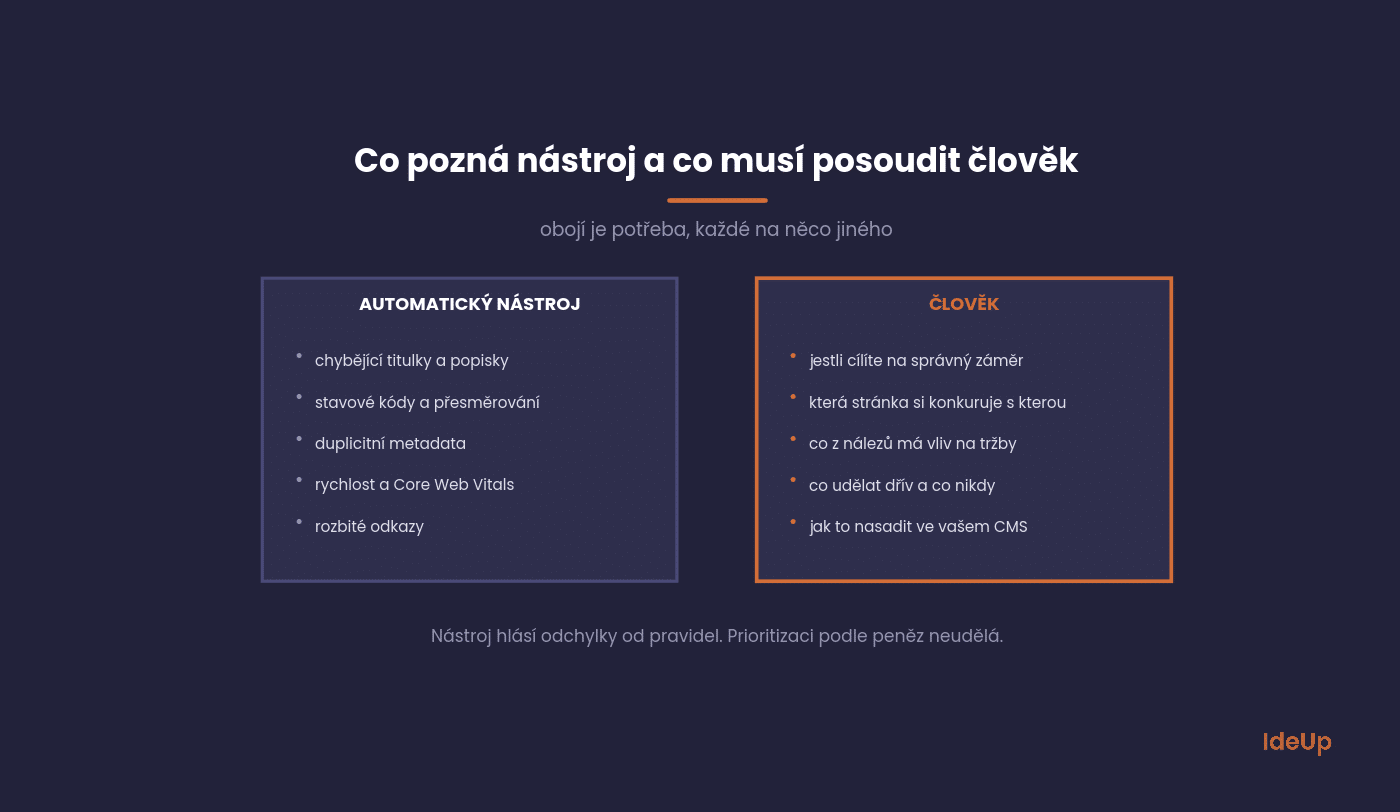
An automated audit will tell you that a description is missing or a title is too long. It will not tell you that an entire category targets a query for which Google only shows how-to guides, so you will never get there with a product page. It will not tell you that two of your pages are competing for the same keyword. And above all, it will not rank the findings by how much money is behind them.
Google itself points out in its SEO Starter Guide that most websites do not need any tricks, but mainly a clear structure and content that answers the query. That is exactly the part a scanner cannot assess.
How to turn findings into a work plan
The most common reason an audit ends up in a drawer is not its quality. It is its length. If you get 300 findings sorted by error type, you will not start anywhere. That is why we sort everything we find into a simple matrix.
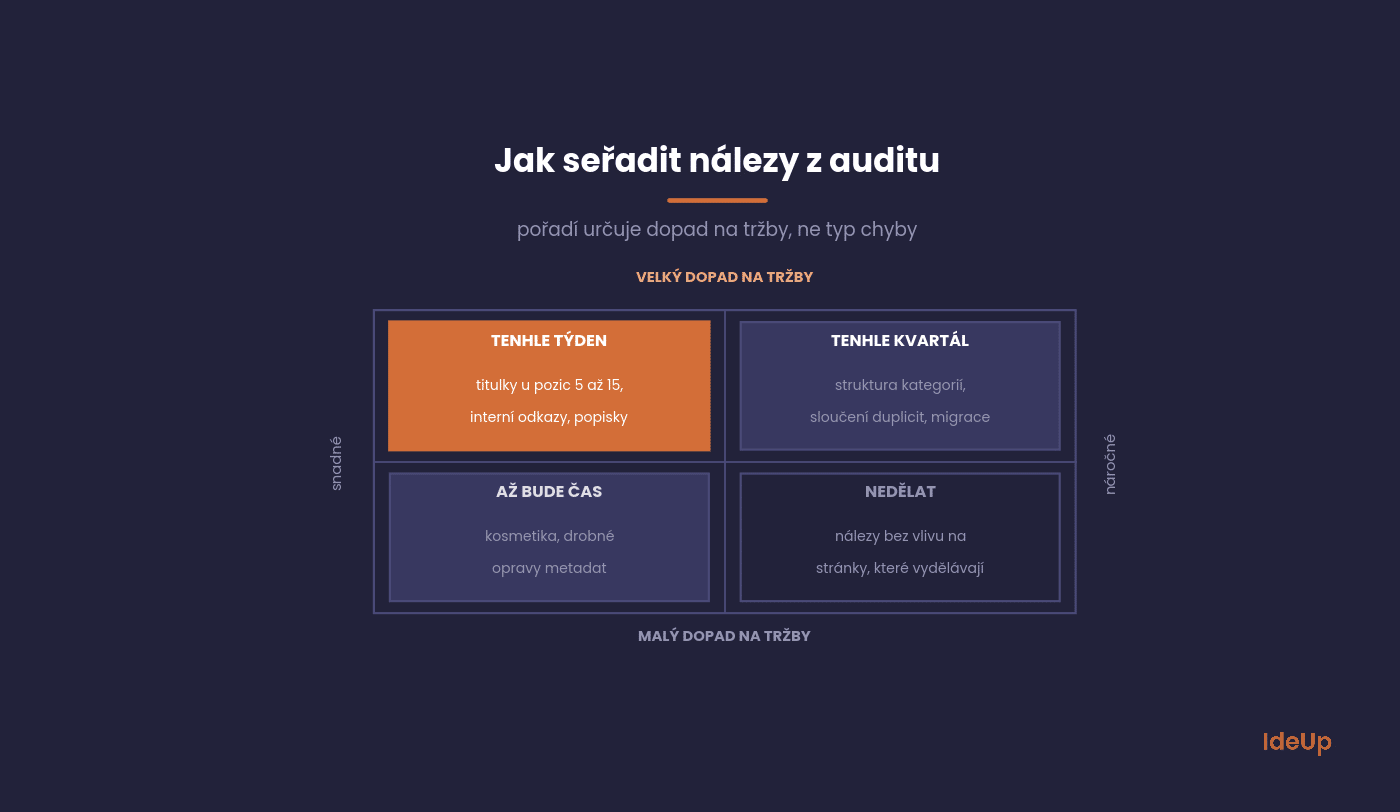
Top left (high impact, low effort) are the things you do this week: titles on pages in positions 5 to 15, fixing missing descriptions on conversion pages, adding internal links to categories that lead nowhere.
Top right (high impact, high effort) is work for the quarter: rebuilding the category structure, merging cannibalising pages, migrating to faster hosting.
Bottom left are quick cosmetic fixes you do at the next opportunity. And bottom right is what you do not do at all, even if the tool flags it in red.
Common mistakes in a website SEO audit
Even a careful audit can lead you in the wrong direction. These are the mistakes we see most often when companies do the work on their own.
- Checking pages one by one instead of templates. Most problems repeat on every page built from the same template. Fix the template once and you fix hundreds of pages.
- Comparing the wrong periods. If your business is seasonal, compare a month with the same month a year earlier, not with the month before.
- Skipping the baseline. Before you change anything, save the current clicks, conversions and positions for your main pages. Without them you cannot show what the work achieved.
- Changing everything at once. If you rewrite titles, move categories and switch hosting in the same week, you will not know which change helped and which one hurt.
How often, and what to ask about
A full audit makes sense once a year, after a redesign, after a website migration or when traffic drops for no obvious reason. In between, a monthly look at Search Console and Analytics is enough.
When you order an audit, ask three things. Who will do it, and whether the hands and the head are the same person. Whether the output will be a list of errors or a prioritised work plan. And whether someone will help you implement it, because an audit that nobody implements is the most expensive document in the company.
What drives SEO audit cost
The price of an audit depends mainly on its scope. These are the factors that move it up or down:
- the size of the website and the number of different templates
- the number of languages and markets the site serves
- whether a review of competitors and content is included
- whether you get a list of errors or a prioritised work plan
- whether help with implementation and a follow-up check are part of the deal
When you compare offers, compare what is in them. If, for example, one quote says $500 and another $5,000, ask both providers for a list of what you will receive. The cheaper one is often an automated report with a short summary. The more expensive one usually includes manual analysis and a plan. Neither is wrong, as long as you know which one you are buying.
What you ask us
Five questions we hear from clients almost every time an audit comes up.
How much does an SEO audit cost?
On the Czech market, the range runs from a few thousand CZK for an automated report to tens of thousands of CZK for an audit of a large online shop with an implementation plan. It depends on the size of the website and whether prioritisation and support with implementation are included.
Can I do an SEO audit myself?
The first level, yes. The steps above are designed exactly for that. Where people without experience most often get stuck is assessing search intent and deciding which findings are worth addressing at all.
How long does it take for changes to show?
Small title tweaks show within weeks. Structural changes and content take three to six months. Anyone who promises results within a month is either not working with organic search or not working honestly.
Is a free online SEO audit any use?
As a first signal, yes. As a basis for decisions, no, because it does not know your business or your competitors and cannot rank findings by impact.
How can I tell if an audit is good?
If, after reading it, you know what you will do next week, and why. Not by the number of pages.
What next
Go through the five steps above. If they show that your website is technically sound and you know what your traffic relies on, you have saved yourself an expense. If they raise more questions than answers, it is a good moment for an outside view.
At IdeUp, we do SEO audits as a basis for decisions, not as a tool printout. Take a look at search engine optimisation, or book SEO consulting straight away, where we spend an hour going through your website and tell you whether a deeper audit makes sense at all.
Frequently asked questions about SEO audits
What is an SEO audit in simple terms?
It is a review of your website that explains why it does or does not attract visitors from Google and what to change. A good one covers the technical state of the site, its content, its links and its results. The output should be a list of priorities, not just a list of errors.
How do I do an SEO audit for the first time?
Start with Google Search Console to see which pages and queries bring you traffic. Then crawl the site, check the index and measure speed. Finish with the checklist above and sort every finding by its impact on revenue and the effort it needs.
Is an SEO site audit the same as a website SEO audit?
Yes, both terms describe a review of the whole website. They differ from a page audit, which looks at a single URL in detail. If a provider uses either term, ask what exactly the scope covers.
Does a more expensive SEO audit mean a better one?
Not necessarily. The price reflects scope, such as the size of the site, the number of languages and whether implementation support is included. Judge an audit by whether it tells you clearly what to do next and why.