

Keyword research is the most commonly commissioned and the most poorly used piece of work in all of SEO. Companies order it, receive a spreadsheet with three thousand rows, say thank you and never look at it again. The problem is usually not the data. It is that the spreadsheet was never turned into a decision.
This guide describes the process we use at IdeUp. The goal is not the longest possible list. The goal is to know how many pages the website should have, what each of them will be about and in what order you will create them.
Why it pays to do this at the start
Keyword research is not an SEO task. It is the basis for your website architecture and your content plan. If you do it after the website is finished, you end up fixing the structure. If you do it beforehand, you build the structure around it.
The practical impact is greatest for online shops. Enquiry almost never mirrors the way you have divided your product range. People search for “women’s winter jackets for the city”, while you have a “Jackets” category and a “season” attribute. Keyword research is what reveals this mismatch before it costs you a year of traffic.
The process in six steps
The whole process can be divided into six steps. The first three are data collection and can largely be automated. The last three are decision-making, and no tool can do that for you.
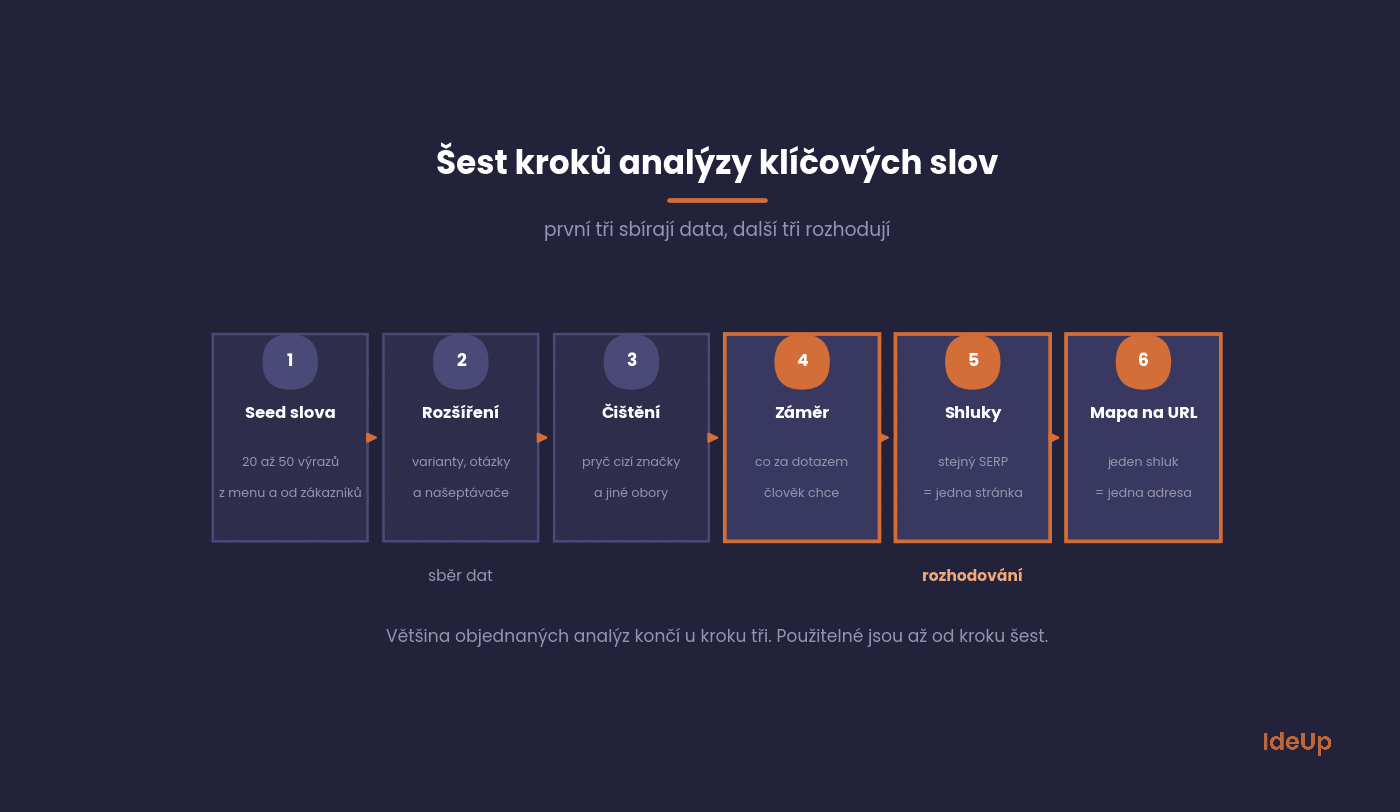
1. Seed keywords
Start with a list of 20 to 50 terms that you, your customers and your competitors use to describe your field. Sources: your own website menu, product names, questions from emails and chat, competitors’ websites and your website’s internal search.
2. Expansion
Run each seed keyword through a tool that finds variations, questions and autocomplete suggestions for it. For the Czech market, the most accurate search volumes come from tools using data from Seznam (the Czech search engine) and Sklik. At this step, the list balloons from fifty terms to thousands, which is fine.
3. Cleaning
Remove everything that does not belong to you: other brands, locations where you do not operate, and terms with a different meaning (the classic case is a word that means something completely different in another field). This is where the list usually shrinks to a third, and that is a good thing.
4. Search intent
For each keyword, decide what the person searching for it wants. Without this step, the whole spreadsheet is useless, because you will never get a product page to the top for a query with informational intent, however you optimise it.
5. Clustering
Keywords for which Google shows essentially the same results belong on one page. Keywords with different results belong on different pages. This is the only reliable way to stop your own pages competing with each other.
6. URL mapping
Each cluster gets one specific URL, one main query and one page type. This is an output you can actually work with.
How to do keyword research for free
You do not need a paid tool to get through all six steps. Paid tools save time and give more precise estimates, but the process stays the same. A free version takes longer and gives you rougher numbers. That is acceptable if you use the numbers to compare terms with each other rather than to forecast traffic.
- Autocomplete suggestions. Type a seed term followed by each letter of the alphabet and note the completions. It is slow, but it reliably uncovers variations you would not think of.
- Related questions and terms. The boxes with questions and related phrases shown alongside the results tell you how people word the same need.
- Google Trends. It shows no absolute numbers, but it reveals seasonality and whether interest in a topic is growing or fading. It also lets you compare two ways of saying the same thing.
- Your own data. The terms that already bring visitors to your site show where you have a foothold and which pages are close to performing better.
- Competitors’ structure. Their categories, menus and article headings show how they have divided the topic into pages.
The main drawback is the lack of reliable volume figures. Prioritisation therefore rests more on business value and on what you see in the results. For a small site with a few dozen pages, this is often enough.
Search intent determines the page type
Intent is the most underrated part of the whole research. Yet it is the only thing that reliably determines whether a page stands any chance at all. The quickest check is to google the query and look at what is in the top ten. If there are no pages of your type, there is no point entering the contest.
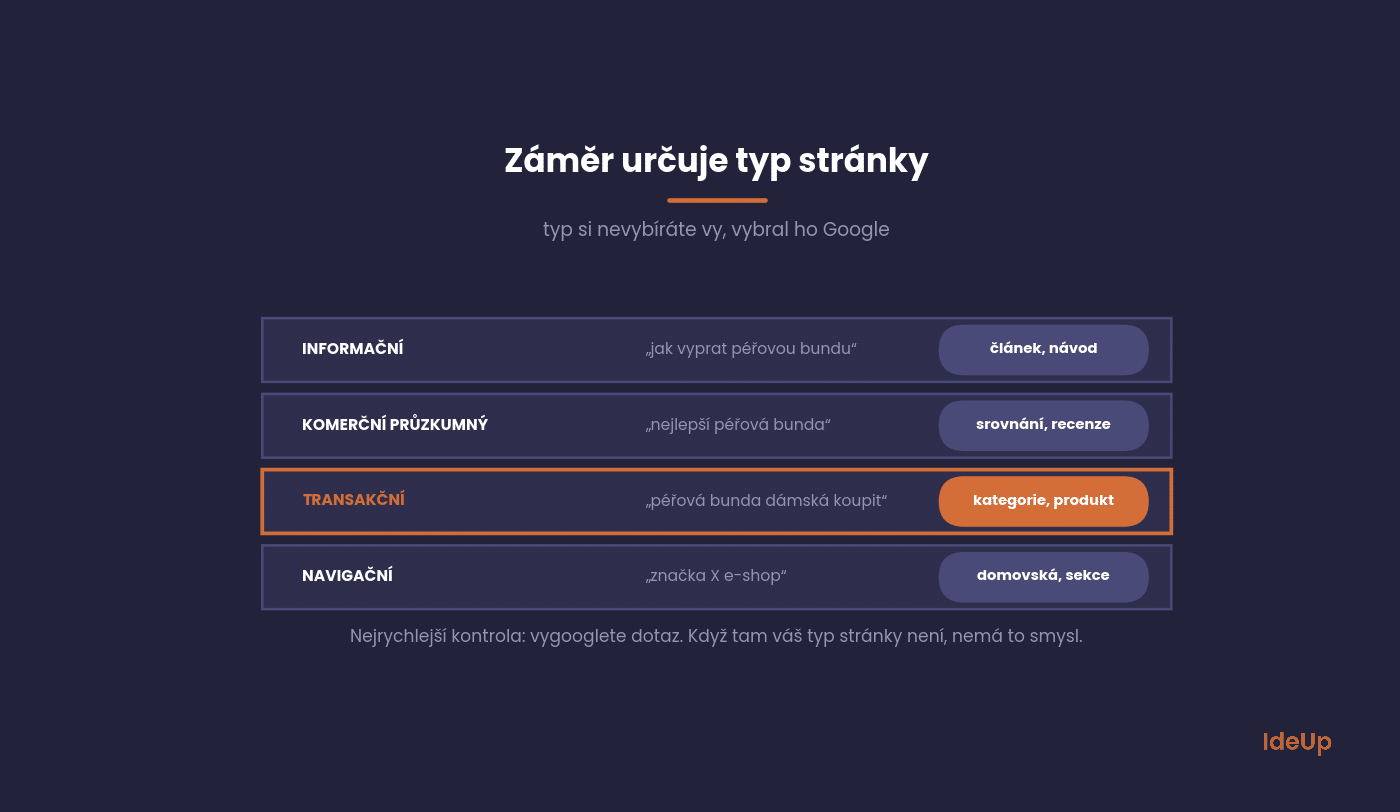
Informational queries (“how to wash a down jacket”) belong to articles and guides. Commercial investigation queries (“best down jacket”) belong to comparison overviews and reviews. Transactional queries (“buy women’s down jacket”) belong to categories and product pages. Navigational queries (“brand X online shop”) belong to the homepage or a specific section.
A detailed methodology for approaching intent and reading the signals in the SERP is described by Patrik Pilous in his guide to keyword research, with whom we work on SEO projects.
How to do local keyword research
If your customers come from a specific area, as with a dental practice, a law firm or a plumber, location becomes part of the intent. A service combined with a city name often brings up a map with businesses rather than ordinary articles. That tells you your business profile matters as much as the page on your website.
- Combine each service with the places you actually serve, such as a city, a district or a region.
- Include phrases with an implied location, such as “near me” or “open now”. They contain no place name but still expect a local answer.
- Check the results for each combination. If they show a map, your profile, address details and reviews carry the weight. If they show directories, you may need to be listed in them.
- Create a separate page for a location only when you have something specific to say about it, such as an address, a local team, references from the area or different prices.
The most common mistake is a set of near-identical pages that differ only in the town name. They add little for the reader and tend to compete with each other.
How to read search volume without being misled
The figures from tools are estimates, not measurements. Two tools will give you different numbers for the same query, and both will be off. Use them to compare queries against each other, not as absolute truth.
Three things people most often get wrong:
- Seasonality. An annual average tells you nothing for seasonal products. A query with an average of 550 may have 1,300 in September and 190 in June. Plan according to the monthly breakdown, not the average.
- Adding up duplicates. “analýza klíčových slov” and “analyza klicovych slov” (the same phrase with and without diacritics) are the same thing to Google. If you add their search volumes together, you inflate your expectations.
- Difficulty without context. Difficulty scores are mainly based on links. For a query where the top ten consists of four online shops and Wikipedia, a low score will not help you.
In its keyword research guide, Ahrefs points out the same thing from the other side: search volume is an estimate of the number of searches, not the number of visits a query will bring you. So a more useful question than search volume itself is how many of those searches end in a click. For queries that Google answers directly in the SERP, traffic is significantly lower than the volume would suggest. That is the subject of GEO, or generative engine optimisation.
From spreadsheet to website structure
The final step is the one that turns the research into a usable document. Each cluster is assigned to one URL and given the role the page is meant to fulfil.
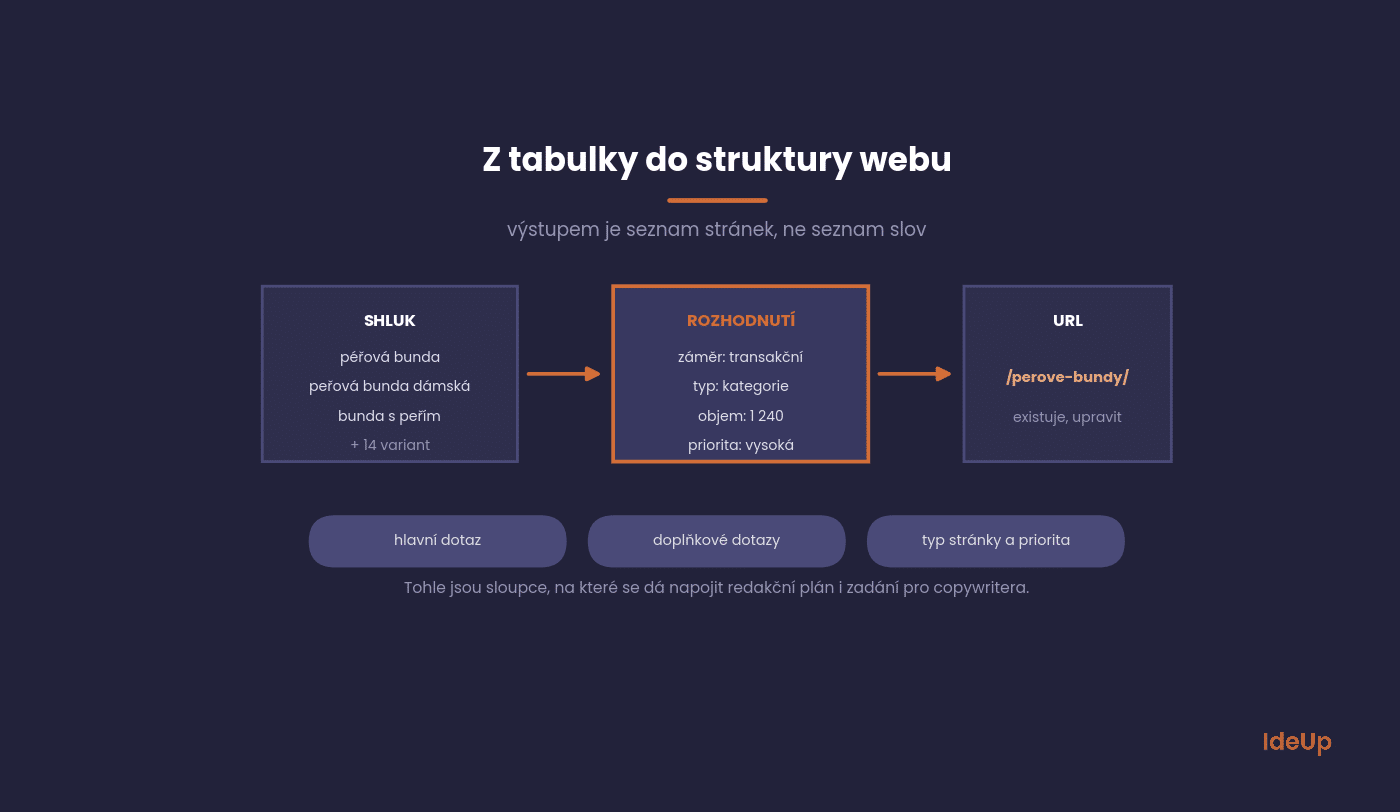
In practice, this means the following columns: main query, secondary queries, total search volume, intent, page type, target URL (existing or new), status and priority. Both an editorial plan and briefs for a copywriter can be built on this format.
Set priorities by combining volume, difficulty and business value. A query with a search volume of 90 and clear purchase intent is often more valuable than a query with a search volume of 3,000 that brings in people who will never buy.
Adjusting the process for ecommerce and content marketing
Online shops
Start from your product data rather than a blank sheet. Brands, product lines, model names and attributes such as material, size or colour are ready-made seed terms. Combine them systematically and check which combinations show category pages in the results. Those are candidates for filter pages that deserve their own indexable URL. Specific model names usually belong to product pages, and comparison terms to buying guides that link to the relevant categories.
Content marketing
Here the goal is usually not a direct sale but reaching people earlier, while they are still learning about a problem. Collect the questions your customers ask at each stage, from understanding the problem to comparing solutions, and group them into topics. One broad guide covers the core topic, and narrower articles answer specific questions and link back to it. Give each article a clear role on the path towards your commercial pages, otherwise you end up with visitors who never turn into enquiries.
What to avoid
- Research without looking at competitors. Before you start, look at what the sites above you live on. It will save you months of testing.
- One page for ten unrelated keywords. The result is a page that ranks for nothing.
- Ten pages for one keyword. Classic cannibalisation. Google picks one, usually the worse one.
- Ignoring the long tail. Long queries have lower volume but a higher conversion rate and much less competition. For online shops, this is exactly where there is room for filter pages.
- Never updating. Enquiry changes. Reviewing the map once a year and adding new keywords is the minimum.
Questions from practice
The things you ask us most often when commissioning keyword research.
How long does keyword research take?
Two to three days for a small website. For an online shop with thousands of products, more like two to three weeks, because the biggest part of the work is not collection but clustering and mapping to the structure.
How many keywords should I have?
That is not the interesting question. The interesting one is how many clusters you have, because that matches the number of pages you have to create and maintain.
Can I use AI for this?
For clustering and topic suggestions, yes, it saves hours. For search volumes, no. Always check those in a tool with real data. A model will happily make the numbers up for you.
Is Google Keyword Planner enough?
For rough orientation, yes. The problem is that without active campaigns it shows volumes in broad ranges and has no data from Seznam, which is still relevant in the Czech market.
How do I spot cannibalisation?
In Search Console, filter for a specific query and look at the pages that appear for it. If several of them keep alternating, you have a problem.
Where to start in your case
If you have nothing, start with step one and take care over your seed keywords. The quality of the whole research is decided here, not in the tool. If you already have a spreadsheet gathering dust, skip to step five and turn it into a page map. That is the step that is usually missing.
At IdeUp, we always deliver keyword research with an output in the form of a map to specific URLs, so that you can start commissioning work from it straight away. Would you like to discuss what it would look like for you? Get in touch via Contact.
Frequently asked questions about how to do keyword research
Can you do keyword research for free?
Yes. Autocomplete suggestions, related questions, Google Trends and your own analytics cover the collection steps. What you lose is precision in volume estimates and time, because much of the work becomes manual. The decision-making steps cost nothing in any case.
How is local keyword research different from regular keyword research?
The process is the same, but you combine each service with the places you serve and check whether the results show a map. Where they do, your business profile, address details and reviews matter as much as the page itself. Location pages only make sense where you have genuinely local content.
How do you do keyword research for an ecommerce site?
Begin with your product data, meaning brands, models and attributes. Map broad and attribute-based terms to categories and filters, specific model names to product pages and comparison terms to guides. Review the map whenever you add a new product line.
How do you do keyword research for content marketing?
Focus on the questions and problems your customers have before they are ready to buy. Group them into topics, give each topic one main article and link the narrower pieces to it. Judge each article by whether it leads readers towards your offer, not only by the number of visits.