
Technical SEO is the part nobody wants to pay for, because it isn’t visible. It won’t give you an article to share on social media, or category copy to show in a meeting. All it does is make everything else start working. Most websites that come to us saying “SEO doesn’t work” have a problem right here.
This text works from the foundations upwards: what has to go right for your content to get into the game at all, and in what order to tackle it.
What has to happen before content starts working
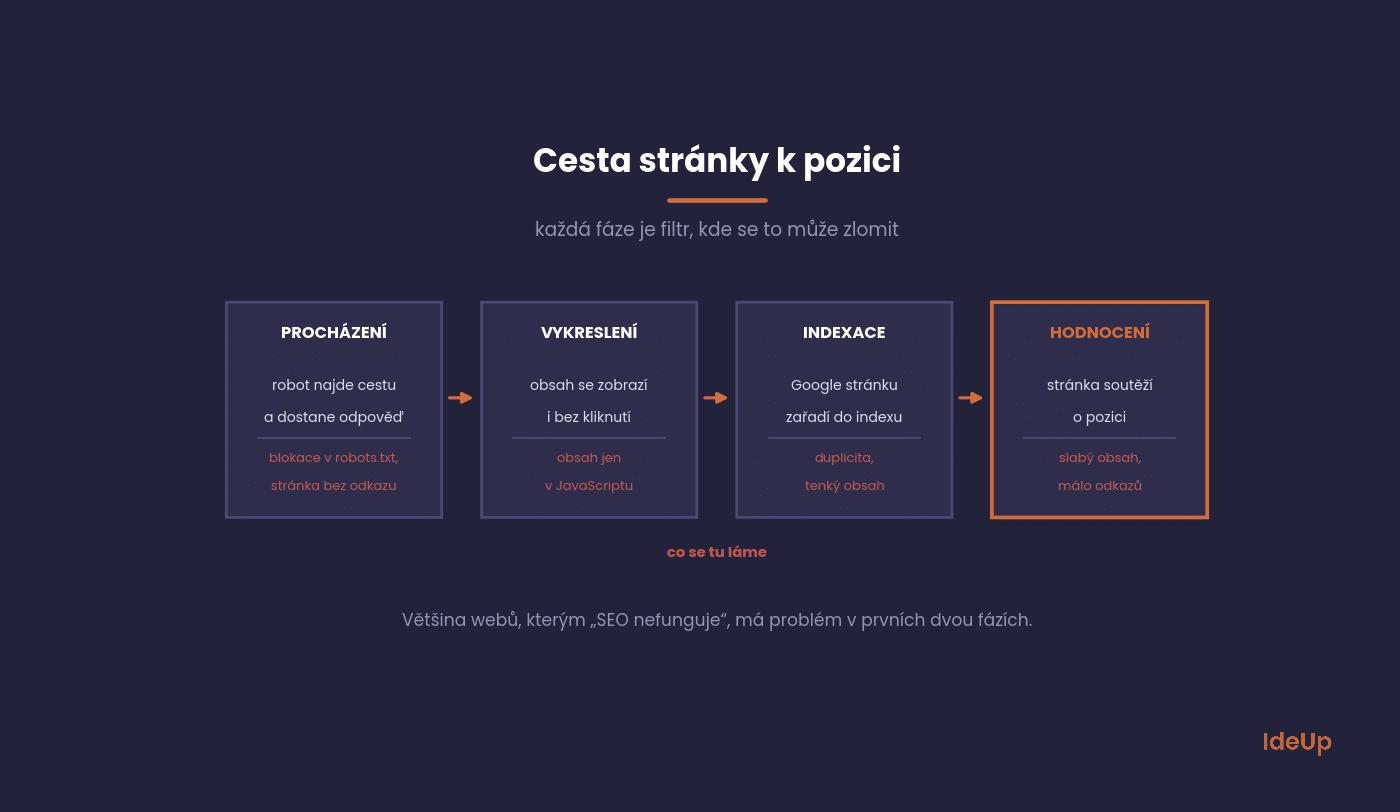
A page’s journey from the server to a ranking has four stages, and it can break at any of them. It helps to know which stage your problem is in, because the solution is completely different each time.
Crawling
The bot has to find a route to the page and get the right response from the server. The most common snags: the page only exists inside a filter that nothing links to, robots.txt blocks it, or the server returns an error under load.
Rendering
If content is generated by JavaScript, the bot has to execute the page. This does happen, but with a delay and not always reliably. A simple rule follows from this: anything commercially important to you should be in the HTML from the start, not added later by JavaScript.
Indexing
Google decides whether to include the page at all. It won’t if it considers the page a duplicate, thin or unimportant. This is where the fate of filter pages on e-shops is decided.
Ranking
Only here does the competition for rankings begin, which is what people think SEO is all about.
What is technical SEO and what does it cover
Technical SEO is the work on a website’s infrastructure that lets Google reach, read and store your pages. It deals with the server, the code, the address structure and the way pages link to each other. It does not deal with what your text says or who links to you from other websites.
Content answers the question of whether a page is worth showing. The technical side answers whether the page can be found and understood at all. If the second answer is no, the first question never gets asked.
In practice, the work falls into five areas:
- Server and hosting, meaning response codes, stability and redirects.
- Architecture, meaning URL structure, navigation and internal links.
- Code and rendering, meaning what is in the HTML and what JavaScript adds later.
- Duplicate control, meaning canonicals, parameters and indexing rules.
- Performance, meaning speed and stability on real devices.
Seven things we check first
When we start a new project, we always work through the same list. It uncovers most serious problems within half a day.
Status codes and redirects
Existing pages should return 200, deleted pages 410 or 404, and moved pages a single 301 redirect. Not two, not five in a row. Redirect chains are the most common leftover from every migration.
Canonicalisation
When the same content is available at several addresses (with a parameter, with and without a trailing slash, with and without www), it must be clear which one is the main one. A badly set canonical can quietly drop entire sections from the index.
Indexing filters and parameters
For e-shops, this is the biggest topic of all. Filter pages can attract a huge amount of long-tail traffic, but only if they are indexable, have their own title and are linked to. At the same time, there mustn’t be so many of them that the bot wastes its time on combinations nobody searches for.
Sitemap and robots.txt
The sitemap should contain only the addresses you want in the index, and it must be up to date. Robots.txt should block the admin area and meaningless parameters, not CSS and JavaScript.
Heading and title structure
One H1 per page, and a unique title and description for every important address. Duplicate titles across categories are a reliable sign that the structure is generated by a template without much thought.
Internal linking
Pages with no internal links pointing to them are marginal for Google, even if they are in the sitemap. The cheapest technical work with the biggest effect is usually adding links to commercial pages.
Mobile version
Google evaluates the mobile version of a website. If there is less content on mobile than on desktop, it evaluates the smaller one.
How to run a technical SEO audit step by step
The checks above tell you what to look at. The order below tells you how to work through it without drowning in data.
- Crawl the whole site with a desktop crawler and save the export. It becomes your baseline for later comparison.
- Compare the crawl with the indexing report. Pages the crawler found that are missing from the index, and indexed pages the crawler never reached, both point to problems.
- Check server logs if you have access. They show which addresses the bot actually visits and how often, which a crawler cannot tell you.
- Group findings by template, not by individual address. One fault in a product template can repeat on thousands of pages, and one fix solves all of them.
- Give every finding an owner. Write down the affected pages, the likely cause and who will fix it. A list without names rarely gets done.
The result should be a short list your developer can act on, not an export of every warning the tool produced.
Speed and Core Web Vitals
Speed is the only part of technical SEO that also has a direct business impact. A slow website loses conversions from people who have already arrived, which is more costly than losing a ranking.
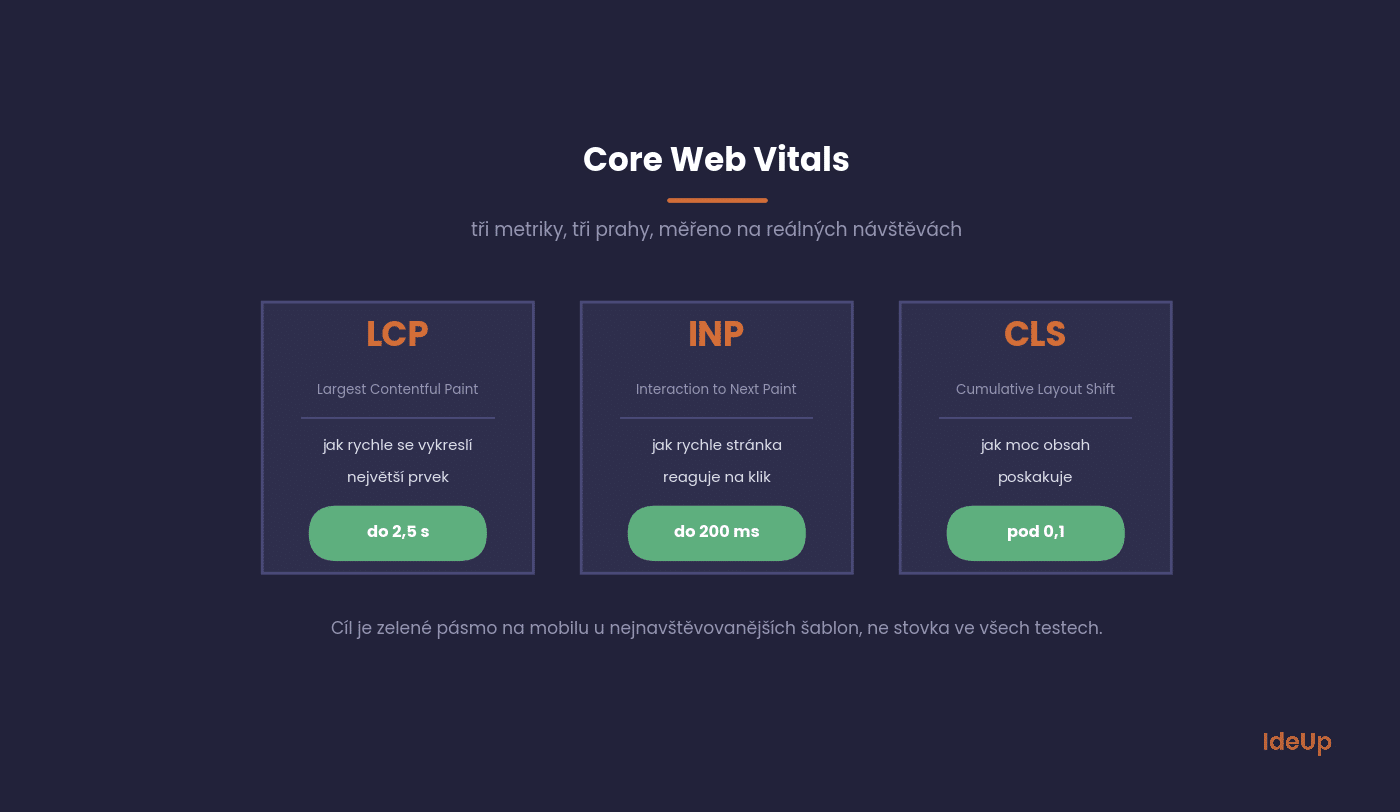
Google measures three things, described in its Core Web Vitals documentation. LCP tracks how quickly the largest element on the screen renders, and it should be within 2.5 seconds. INP measures how quickly the page responds to an interaction, and it should be within 200 milliseconds. CLS monitors content jumping around while loading, and it should be below 0.1.
In practice, the source of the problems is almost always the same: uncompressed images, too many third-party scripts and a template that loads everything on every page. A realistic goal is to reach the green zone on mobile for the most visited templates, not to score 100 in every test.
What to fix first and what can wait
A technical audit produces hundreds of findings sorted by type, not by importance. The order we use is based on how much money each problem costs.
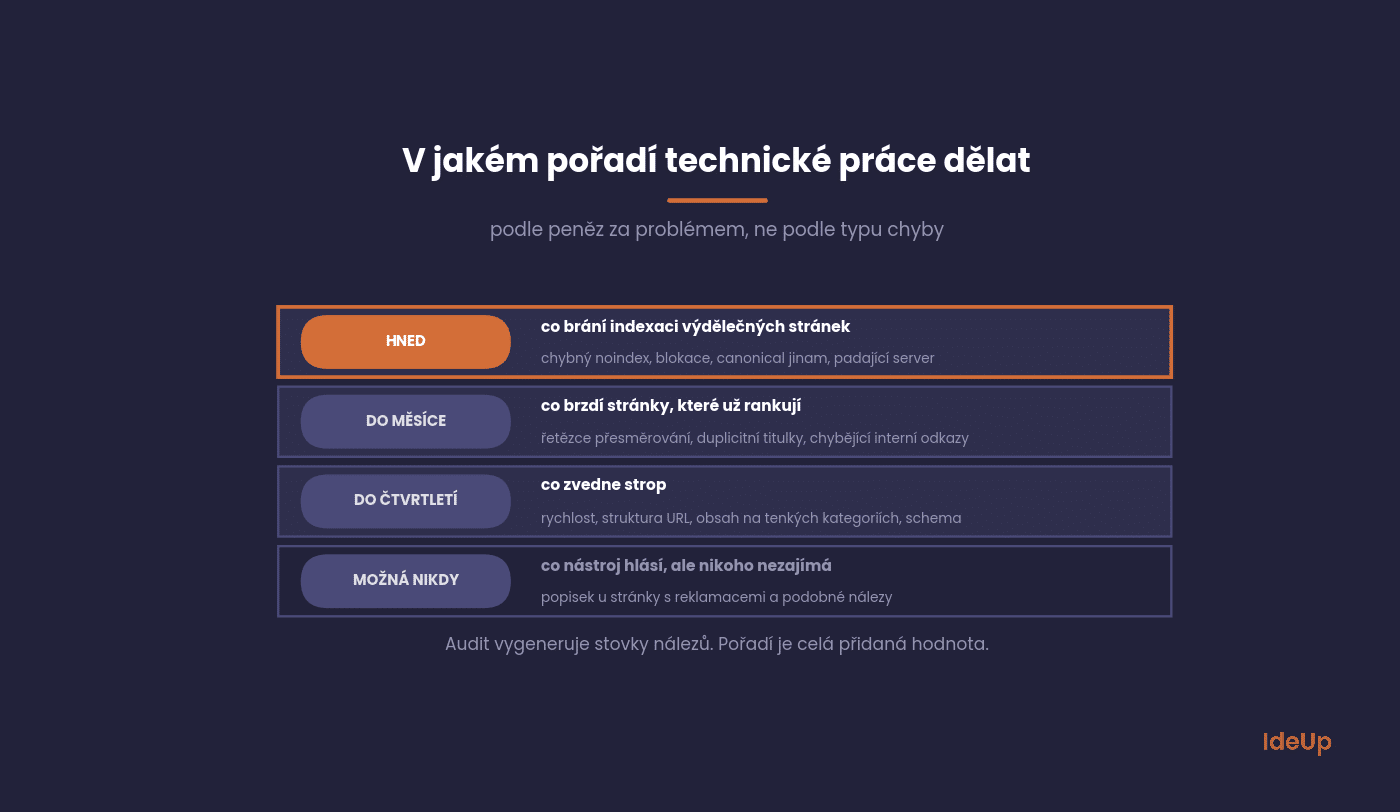
Immediately: anything that prevents your revenue-generating pages from being indexed. A mistaken noindex, a block in robots.txt, a canonical pointing elsewhere, a server that crashes under load.
Within a month: redirect chains, duplicate titles on categories, missing internal links to commercial pages, filter indexing.
Within a quarter: speed, URL structure, content on thin categories, structured data.
Maybe never: findings the tool flags in red but which don’t affect any page that earns you money. For example, a missing description on the complaints page.
Ecommerce technical SEO beyond filters
Online shops face problems that content websites rarely do, because their pages change every day.
Out-of-stock and discontinued products
Keep temporarily unavailable products live and show their availability clearly. For discontinued products, redirect to a genuine replacement or to the closest category. If no equivalent exists, let the page return 410 or 404. Redirecting everything to the homepage helps nobody.
Product variants
Sizes and colours on separate addresses create near duplicates. Decide whether a variant deserves its own page because people look for that specific version. If not, point its canonical to the main product.
Internal search results and pagination
Pages generated by your own search box are endless and thin, so keep them out of the index. Paginated categories, on the other hand, should stay crawlable through plain links, otherwise products deeper in the list become unreachable.
When to get started
Technical SEO delivers the highest return at three moments. Before launching a new website, because fixing the structure on paper is far cheaper than after deployment. After a migration or redesign, when the most things break. And when traffic is falling for no obvious reason.
Outside these moments, a quarterly crawler check and a monthly look at the Page Indexing section in Search Console are enough.
From a checklist to a technical SEO strategy
A checklist tells you what is broken today. A strategy makes sure it does not break again with the next release. These are the mistakes that undo good work most often:
- Leaving developers out until the audit is finished, so the recommendations ignore how the system really works.
- Copying a test environment to production together with its noindex tag.
- Releasing template changes without checking status codes, canonicals and indexing rules first.
- Judging progress by a tool’s score instead of by the number of indexed commercial pages and the traffic they receive.
The simplest fix is to add a few technical checks to your release process. It takes minutes per release and prevents most of the problems an audit would otherwise find months later.
Questions we get asked
The most common questions about the technical side, usually from people who manage their website themselves.
Is technical SEO more important than content?
It isn’t more important, it comes first. Content on a page that Google doesn’t index has no way to work. Once the technical side is right, content takes over as the main engine.
Will website speed improve my rankings?
The direct effect is smaller than people say. The indirect effect is large, because speed affects whether people stay and buy. Treat it as an investment in conversions, not in rankings.
Do I need structured data?
For an e-shop and for content where rich results make sense (products, reviews, how-tos, events), definitely. Elsewhere it’s a nice to have.
How do I find out that Google isn’t indexing something?
The Page Indexing section in Search Console lists the reasons for exclusion. For a specific address, use URL Inspection directly in Search Console.
Will a plugin solve technical SEO?
A plugin sets up the basics (sitemap, canonical, meta tags), and that’s a lot. It won’t fix the website structure, filter indexing or template speed.
Where to start on your site
Open Search Console, go to the Page Indexing section and compare the number of indexed addresses with the number of pages on your website that you want to be visible. If the numbers don’t match, you have your first task, and you don’t need to pay anyone for it.
If this raises more questions than answers, we’ll go through it with you. Technical SEO is part of our search engine optimisation service, and we also handle it when building new websites, where it is cheapest.
Frequently asked questions about technical SEO
What is the difference between technical SEO and on-page SEO?
Technical work decides whether a page can be crawled, rendered and indexed. On-page work deals with the content itself and how it is presented, such as titles, headings and text. The two overlap in areas like title tags and structured data.
Can I do a technical SEO audit myself?
On a smaller website, yes. A crawler, Search Console and a clear list of checks will uncover most serious problems. Larger websites with heavy JavaScript, many templates or a recent migration benefit from someone who can read server logs and talk to developers in their terms.
How long does it take to see results from technical SEO?
It depends on how often Google revisits your pages. Fixes to blocking errors usually show once the affected pages are crawled again, which is faster for frequently visited pages. Speed improvements appear gradually, because the metrics are based on recent real visits.
Is technical SEO different for an online shop?
The principles are the same, but the scale is different. Shops generate many addresses through filters, variants, pagination and internal search, and products appear and disappear constantly. That makes duplicate control and indexing rules far more important than on a typical content website.