
A media plan sets out where and when a campaign will run and how much it will cost. It comes after the strategy, because you first need to know who you are targeting and what the campaign should achieve.
It is also called a media schedule. It is usually a spreadsheet that shows in one place which media the campaign will use, when, at what cost and how many people it will reach.
What a media plan must include
Each row of the spreadsheet is one channel or medium. The columns contain the following details.
- Channel and medium, meaning where the ad will run, from Google Ads to regional radio.
- Goal and the metric that tells you whether it worked. Sales are measured differently from brand awareness.
- The target audience that the channel reaches.
- Format and creative, such as a video, banner, spot or article.
- Start and end dates, ideally by week.
- Budget and buying model, meaning cost per click, cost per thousand impressions or a fixed price.
- Estimated reach and frequency, meaning how many people will see the ad and how many times.
- Who manages the channel and when the results are reviewed.
For online campaigns, this also includes tagging links with UTM parameters. Without them, your analytics will not show which row of the media plan brought in the orders.
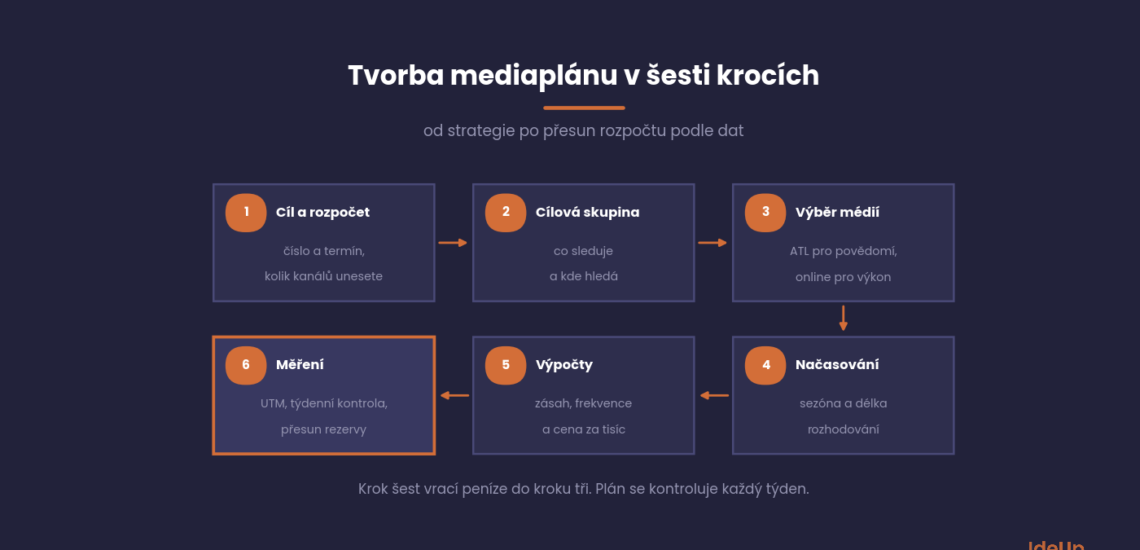
Creating a media plan in six steps
Each step needs the output of the previous one, so the order matters.
- Goal and budget. These come from the marketing strategy. The goal needs a number and a deadline, for example 400 orders of the new collection by the end of April.
- Target audience and where you can reach them. What these people watch and read, and where they search.
- Media selection. Television, radio and print (ATL) build awareness among a large audience, while online channels target specific people and can be measured more precisely.
- Timing based on the season and on how long customers take to decide.
- Calculating reach, frequency and cost for each channel.
- Measurement. What is tracked, when the weekly review takes place and where money goes from a channel that is not working.
The budget determines how many channels you can sustain. A small amount split across too many channels will not reach the necessary frequency anywhere, which is why our model below has only four paid channels.
Media should support each other. When you launch a Christmas discount on the radio, some listeners will then look it up on Google or social media. If they cannot find you there, you have created demand for your competitors. PPC advertising in search captures these people.
In online campaigns, the algorithms of Meta and Google decide the specific ad placements. The media plan therefore mainly sets budgets, dates and measurement, and it is adjusted based on the data at each weekly review.
Sample media plan for an online shop
The figures are illustrative, based on our assumptions for an online shop selling garden furniture that wants to sell a new collection from March to the end of April. The budget is 150,000 CZK (about 6,900 USD) excluding VAT for eight weeks and covers media buying only. Creative production and campaign management are paid separately.
The format is given next to the channel name and the target audience is the same for the whole campaign: people furnishing a garden or terrace. We calculate reach and frequency for Meta below.
| Channel | Goal | Dates | Budget | Buying | What we measure |
|---|---|---|---|---|---|
| Google Ads, Search and Shopping | sales to people already searching | weeks 1 to 8 | 60,000 CZK (about 2,800 USD) | per click | revenue and PNO |
| Meta, video and images | awareness of the new collection | weeks 1 to 3 and 5 to 6 | 35,000 CZK (about 1,600 USD) | per thousand impressions | reach and frequency |
| Remarketing on Meta and Google Ads | bringing visitors back | weeks 2 to 8 | 15,000 CZK (about 690 USD) | per click and per impression | orders |
| Article in a home and living magazine | trust and a link to the website | week 2 | 25,000 CZK (about 1,100 USD) | fixed price | visits and orders from the link |
| Newsletter to existing customers | repeat purchases | weeks 1 and 5 | 0 CZK (about 0 USD) for media | owned channel | revenue from email |
| Reserve | shift to the channel that works | weeks 4 to 8 | 15,000 CZK (about 690 USD) | depends on channel | orders |
Most of the money goes into search, where people are already buying. Here the metric is PNO (podíl nákladů na obratu, the cost-to-revenue ratio), meaning what percentage of the channel’s revenue was eaten up by advertising. We cover how to set up social media campaigns in our article on Facebook and Instagram advertising.
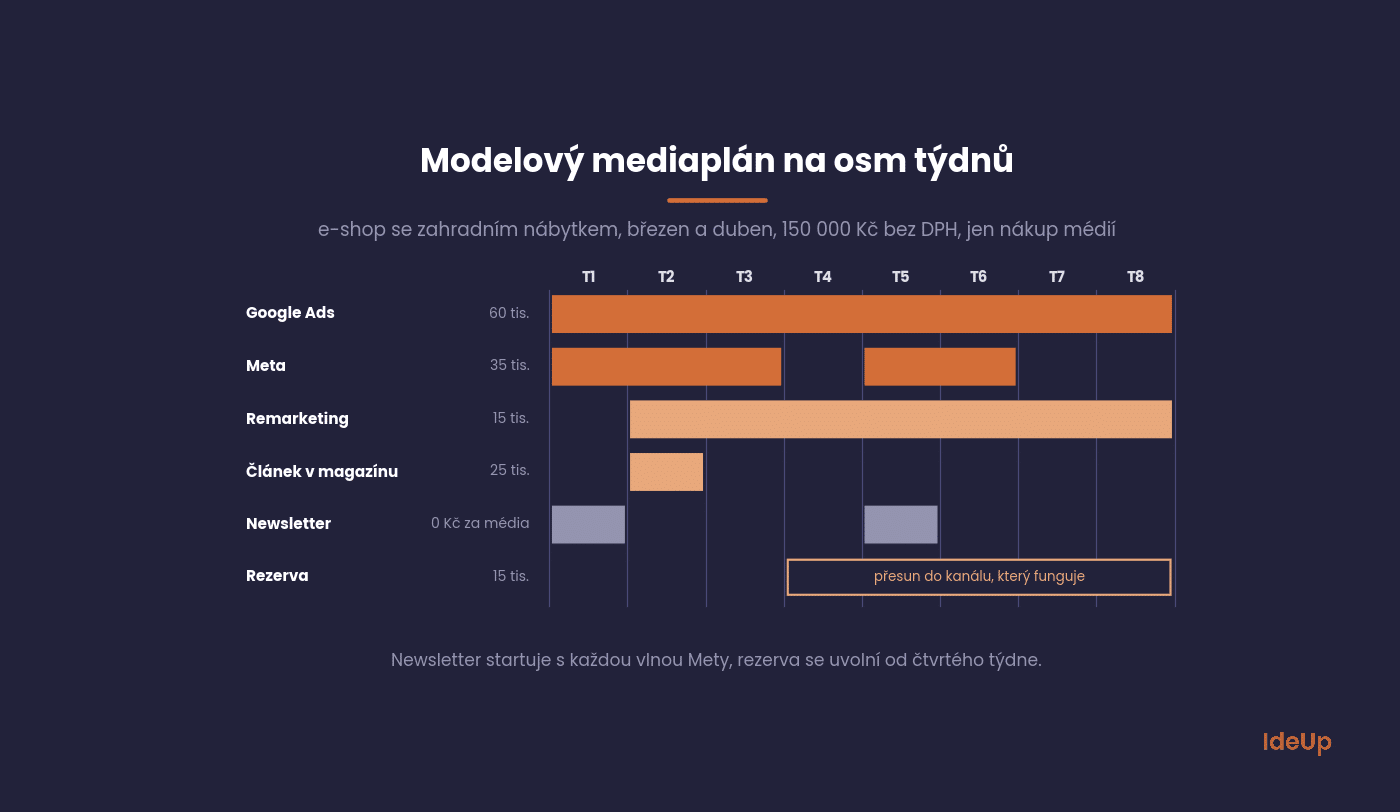
You release the reserve of 15,000 CZK (about 690 USD), a tenth of the budget, from week four. After three weeks you will see which channel is bringing in orders and you move the money there.
The newsletter needs no media buying. You only pay for the tool and the time to prepare it. The sends are scheduled for the start of both Meta waves so that people hear about the collection from several places in the same week.
Reach, frequency and GRP in figures
Reach tells you what percentage of the target audience saw the ad at least once. Frequency tells you how many times, on average, each of them saw it. Multiplying them gives rating points, which are used mainly for planning television.
When the points are calculated for a broad group, usually everyone aged 15 and over, they are called GRP (gross rating points). For your specific target audience, they are more precisely called TRP (target rating points). If an ad reaches 30% of the group and each person reached sees it four times on average, it has 120 points. The GRP glossary entry covers this in more detail.
Online planning starts from the cost per thousand impressions, known as CPT or CPM. From the budget and the CPM you calculate the number of impressions, and dividing that by the average frequency gives you the number of people reached.
In our model, a thousand impressions on Meta cost 100 CZK (about 4.6 USD), so 35,000 CZK (about 1,600 USD) buys 350,000 impressions. At a frequency of 3.5, that is 100,000 people, which is 20% of a target audience of half a million and 70 TRP.
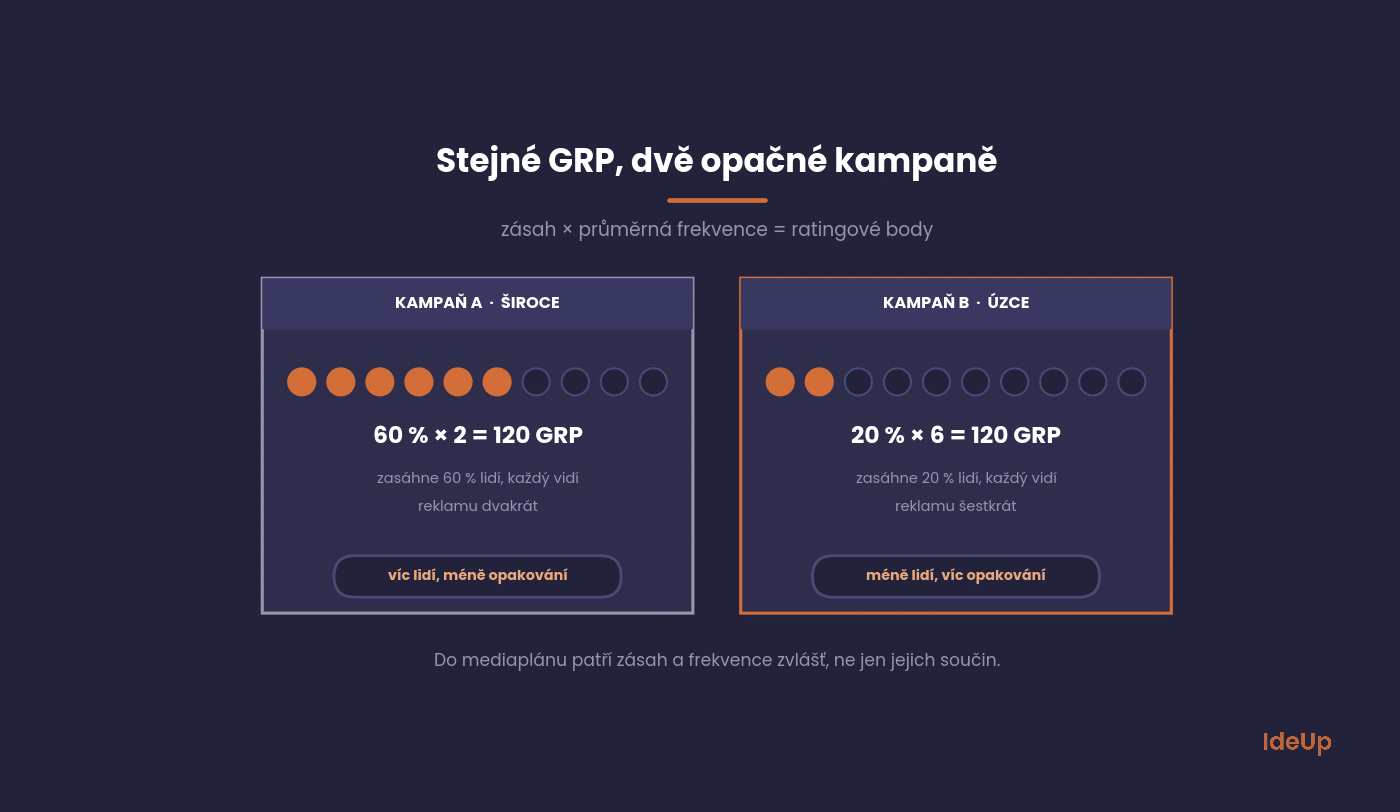
GRP on its own can be misleading. A campaign that reaches 60% of people twice has the same 120 GRP as a campaign that reaches 20% of people six times. The first gets the message to more people, the second repeats it more often to a smaller group. Which option is right depends on the campaign goal and on how well people already know you.
That is why both reach and frequency belong in the media plan, each in its own column. A media offer that states only GRP or only the number of impressions does not tell you how many different people will actually see the ad.
Scheduling the campaign over time
The same budget can be spread over time in three ways. The choice depends mainly on whether the product sells all year round or seasonally.
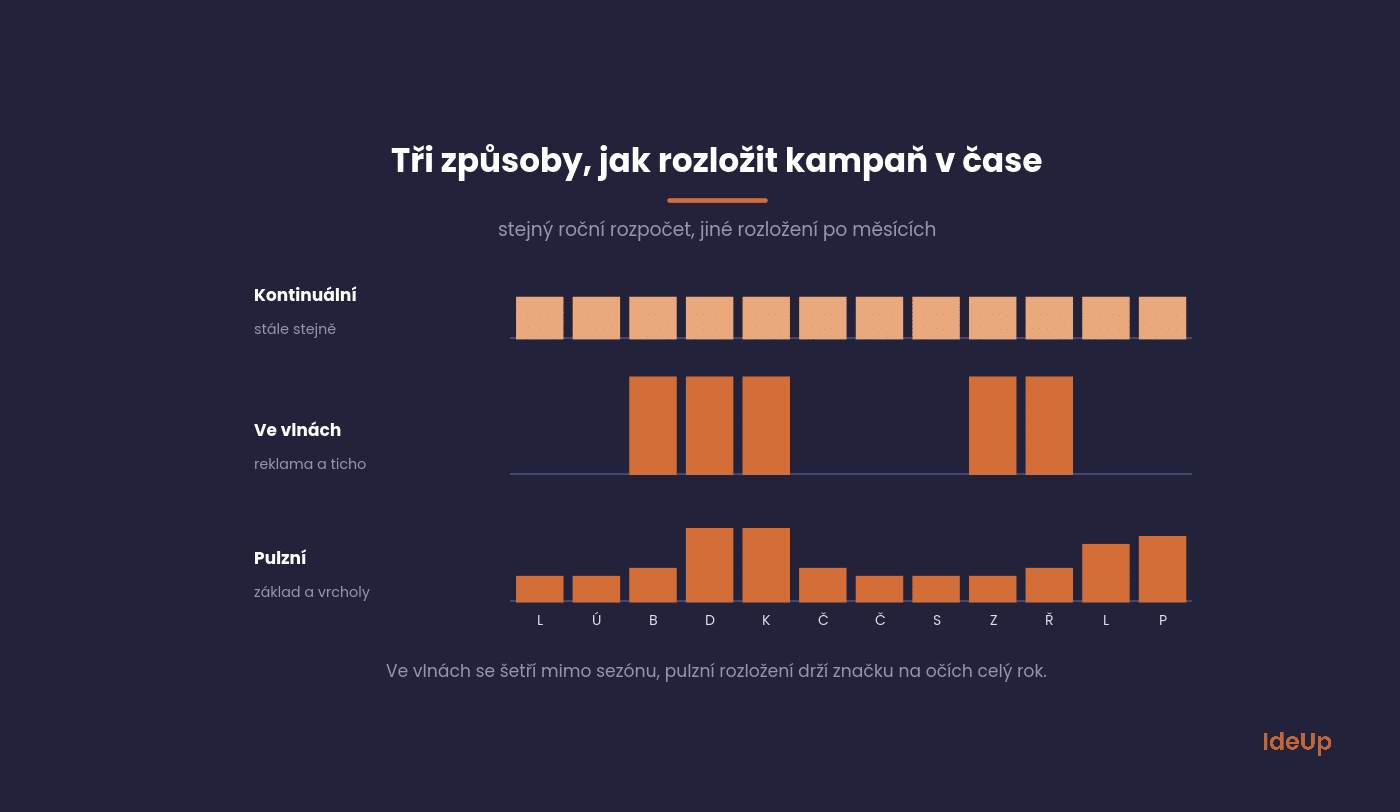
A continuous campaign runs constantly at the same intensity. It suits products that people buy often and regardless of season, but a budget spread over the whole year can be too weak in any given week.
A campaign in waves (known as flighting) alternates periods of advertising and silence, typically for seasonal products. Pulsing combines both approaches. It maintains a low baseline all year and adds more before the season.
Search volume shows when the season starts. According to Marketing Miner, the query “zahradní nábytek” (garden furniture) has 4,200 searches in December, 38,000 by March and a peak of 47,000 in April and May. That is why our model starts in March rather than at the peak.
What a media plan flow chart shows
A flow chart is the visual part of a campaign media plan. Channels go in the rows, weeks go in the columns, and you shade the cells in the weeks when a channel is live. You can see overlaps, gaps and how the waves line up with the season without reading through the detailed table.
Write the weekly budget or the format inside each shaded cell and add a total row at the bottom. This shows which weeks carry the most spend. Use one colour per channel type, for example paid media, owned channels and the reserve, so the structure of the campaign is clear at a glance.
The flow chart and the detailed table must show the same dates and amounts. If you move a wave in one, change it in the other straight away. Otherwise your team and your suppliers end up working from different versions of the plan.
Where to get media data in the Czech Republic
Reach estimates for traditional media are based on measurement that each type of media has its own system for in the Czech Republic. Rate cards and agency planning tools are calculated from it.
- Television. Viewership is measured by a project of the Association of Television Organisations (Asociace televizních organizací, ATO).
- Radio. Listenership is measured by Radioprojekt.
- Print. Readership is measured by Media projekt. In 2025, daily newspapers and magazines had an average reach of 76% of people aged 12 to 79.
- Internet. Traffic to Czech websites is measured by NetMonitor from the SPIR association, which is useful when choosing websites for banners or PR articles.
Meta and Google Ads campaigns are planned directly in their ad managers, which show the estimated reach when you set targeting and budget. The actual figures may differ, so replace the estimate with real numbers at the first weekly review.
A simple media plan for a smaller company
Even a company that only runs Google ads needs a single sheet with the goal, monthly budget, promotion dates and review date. Without it, the algorithm spends the budget as it sees fit and you only find out about the season once it is over.
Excel or Google Sheets is enough: one sheet with an overview of the whole year and more detailed sheets for individual months. Use the columns from the model above as your starting structure, adding target audience, format and estimated reach.
Next to the plan, add columns for actuals, meaning spend, impressions, clicks and orders by week. Only with these can you compare the plan with reality. Specialised planning tools only make sense for TV and radio campaigns.
How to build a media plan template in Excel
A reusable template saves you from rebuilding the structure for every campaign. Set it up as a workbook with four sheets that refer to each other.
- Inputs. Total budget, campaign dates, size of the target audience and the assumed cost per thousand impressions or per click for each channel. Every other sheet pulls its figures from these cells.
- Plan. One row per channel with the columns described earlier. Add formulas so that impressions equal the budget divided by the CPM and multiplied by 1,000, and people reached equal impressions divided by frequency.
- Flow chart. Weeks across the top and channels down the side. Conditional formatting can shade a cell automatically when the week falls between a channel’s start and end dates.
- Actuals. The same rows as the plan, filled in weekly, with a column showing the difference from the plan.
Lock the cells that contain formulas so nobody overwrites them by accident, and put the version date in the file name. When you change an assumption on the inputs sheet, for example a higher CPM, the whole plan recalculates and you see at once how many fewer people the same budget will reach.
Media plan or content calendar
A content calendar manages your own content, meaning social media posts, articles and newsletters. A media plan mainly manages paid space in third-party media, and owned channels belong in it where they are meant to support a paid wave, like the newsletter in our model.
Both plans should align in the calendar. When a paid wave runs in the same week as your own articles and posts on the same topic, people encounter the same message from several directions.
Common mistakes in a paid media plan
- Copying a media plan sample without changing it. Another company’s costs, season and audience size are not yours. Use a sample for its structure only and replace every figure with your own.
- Adding up reach across channels. The same person can see your ad on Meta and on Google. If you add the reach of each row together, you overstate how many different people the campaign will reach.
- Mixing metrics between rows. One channel reported in impressions, another in reach and a third in clicks cannot be compared. Decide on the shared columns before you fill in the plan.
- Planning without a total cost view. If the plan holds only media spend, add a separate summary for creative production, tools and management so the full cost of the campaign is clear.
Before you spend the first crown on a campaign
Check your media plan against four questions. Does the goal have a number and a deadline? Does every row have a metric that tells you whether it worked? Are the links tagged for tracking? And is the date of the first weekly review in the calendar?
If the answer to any of them is no, fix it before you launch the campaign. You can correct a media plan while it is running, but every week without measurement means spending blind.
A paid campaign ends on the last day of its budget, while organic search results keep working. We discuss how to include them in the plan as part of our SEO service.
Frequently asked questions about media plan templates
What is a media plan template?
It is a ready-made spreadsheet with the rows, columns and formulas a media plan needs, so you only fill in the figures for a new campaign. A good template includes channels, goals, dates, budgets, buying models, reach, frequency and a place for actual results.
Is a paid media plan different from a marketing media plan?
A paid media plan covers only the advertising space you buy, such as search ads, social media ads or print. A marketing media plan is broader and can also include owned channels like a newsletter where they support a paid wave. The structure of the spreadsheet is the same for both.
Can I build a media plan template in Excel?
Yes, Excel or Google Sheets is enough for most campaigns. Keep the assumptions on one sheet and let the plan, the flow chart and the actuals calculate from them. This way a change in budget or cost updates the whole plan at once.
Can I use a media plan sample from another company?
You can use it to see how the plan is structured and which columns it contains. Do not take over its figures, because costs, seasons and audience sizes differ between markets and products. Replace every number with your own estimates and real data.
USD amounts are approximate, converted at the Czech National Bank rate of 21.75 CZK per USD on 9 October 2026.


Leave A Reply